
Oviond Blog
How to Optimize Facebook Ads: An Agency Playbook
Learn how to optimize Facebook Ads with a tactical playbook for marketing agencies. From audits to automated, white-label client reporting with Oviond.

Month-end looks the same at a lot of agencies. One account manager has Ads Manager open in ten tabs. Someone else is copying screenshots into slides. A client-success lead is chasing numbers from GA4 because the Facebook totals don't quite match. Then comes the hardest part: writing commentary that proves the work mattered.
That's why agencies struggle to optimize Facebook Ads at scale. Running better campaigns is one half of the job. Explaining what changed, why it changed, and what to do next across 5, 15, or 50 client accounts is the other half. A decent media process is often in place. What breaks is the operating system around it.
The agencies that stay sane build both sides together. They tighten tracking, simplify campaign structure, and stop reporting like every client is a one-off. If your team is also sorting out how AI fits into channel work more broadly, this AI social media marketing guide is a useful companion read because it frames where automation helps and where human judgment still matters.
Table of Contents
- Introduction
- Your Foundational Playbook for Auditing and Measurement
- High-Impact Campaign and Creative Strategies
- Proving Value at Scale: The Agency Bottleneck
- Building Your Automated Reporting Engine with Oviond
- Conclusion From Optimized Ads to A Scalable Agency
Introduction
A Facebook Ads account can look healthy inside the platform and still create chaos inside the agency.
One client has three campaigns too many. Another has weak event tracking. A third is spending fine, but the monthly report takes longer to produce than the optimization work itself. That's the agency version of the problem. The ad account is only one system. The reporting process is another, and both need to work.
I've seen teams make smart media decisions and still lose the narrative with clients because the proof showed up late, inconsistently, or buried in a pile of vanity metrics. Agencies don't need more random platform tricks. They need a repeatable playbook that helps them optimize Facebook Ads, then report the outcome cleanly across a multi-client book of business.
Practical rule: If your team can't explain the win quickly, the client often won't feel it, even when performance improved.
That playbook starts with measurement. Then it moves into campaign structure and creative. Then it deals with the operational mess most agencies avoid talking about until it starts eating margin.
Your Foundational Playbook for Auditing and Measurement
A new client says performance dropped after the last agency changed the account structure. Meta shows one story. GA4 shows another. The CRM is missing leads the sales team swears they called. If you start changing budgets before sorting that out, you are optimizing against noise.
The first job is to establish what can be trusted. Agencies that handle multiple ad accounts well do not win because they make more changes. They win because they run the same audit process every time, document it clearly, and turn it into reporting that account managers can use without rebuilding context from scratch.
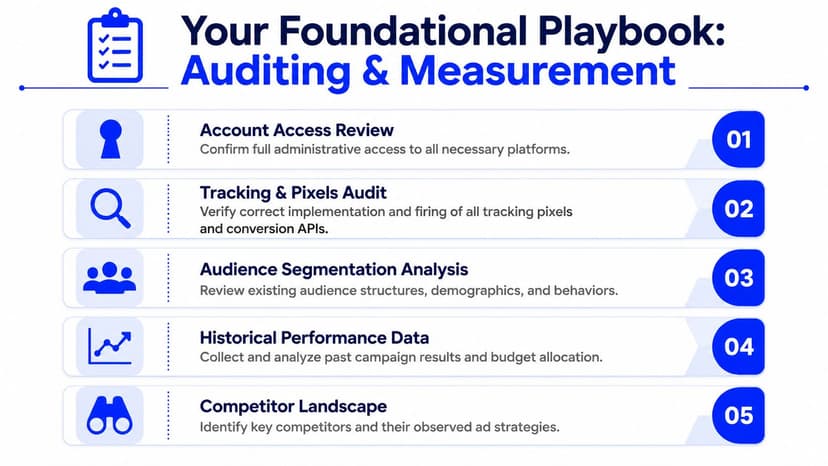
Start with access and event hygiene
Takeover audits usually fail in predictable places. Missing permissions. Broken event firing. Old custom conversions nobody trusts. Campaign names that made sense to the previous team and nobody else.
Start there.
Check access before performance. Confirm the agency has the right permissions in Meta Ads Manager, the website tag setup, GA4, and the CRM or lead destination. If one of those is blocked, the account team wastes hours every month chasing screenshots and exports instead of making decisions.
Review pixel and event implementation. Check whether core events fire correctly, whether values and parameters pass through cleanly, and whether duplicate events exist. Oviond's guide to understanding the Facebook Pixel is a good reference if the client setup is messy and the team needs a shared baseline.
Inspect audience inputs. Review customer lists, exclusions, retargeting windows, and source freshness. A lot of accounts still run on audience logic built for an offer, funnel, or sales cycle that no longer exists.
Audit naming and documentation. Campaigns, ad sets, and reporting labels need to be readable fast. If a strategist cannot tell what is live, what is a test, and what business goal it supports in ten seconds, reporting quality drops right along with optimization speed.
For agencies that also build monitoring or enrichment workflows around public platform data, this roundup on finding the best social media APIs is worth skimming because it helps separate usable tools from noisy options.
Why server-side tracking changes the quality of your decisions
A lot of teams still treat server-side tracking as a technical upgrade they will get to later. In agency work, it is a measurement and reporting issue first.
Stape notes that server-side tracking can provide up to 30% more accurate data on user interactions compared to client-side methods, while incomplete setup can lead to blind optimization and weaker return efficiency inside Facebook Ads (Stape on Facebook ad optimization). That lines up with what shows up in real accounts. Browser restrictions, ad blockers, and fragile client-side setups create gaps. Meta bids on partial feedback, then the monthly report becomes an argument about which dashboard is "right."
That problem gets worse at scale. One account with tracking drift is annoying. Ten accounts with different tracking drift patterns turn reporting into an operations problem. The fix is not just better implementation. It is standardization. Use the same audit checkpoints, the same event priority logic, and the same exception notes across clients so the reporting team is not reverse-engineering every account each month.
If lead quality looks unstable, check signal quality before you rewrite the campaign strategy.
What to document before you touch budget
A solid audit produces decisions, but it also produces a record. That record matters because agencies do not just need to improve accounts. They need to prove what changed, why it changed, and what the client should expect next.
Document these points before any major optimization work starts:
- Primary conversion event: Define the event Meta should optimize toward. Use the actual business action, such as Purchase or Lead, whenever the account has enough signal.
- Attribution confidence: Note where numbers do not align across Meta, GA4, and the CRM, and explain the likely reason.
- Historical account structure: Record whether the account has too many campaigns, legacy tests still running, or conversion goals that shifted without cleanup.
- Creative inventory: List the active offers, angles, hooks, and landing pages tied to each objective.
- Reporting baseline: Lock in the few metrics the agency will use to judge progress so every stakeholder is looking at the same scoreboard.
This step saves margin.
Without documentation, each strategist explains the account differently, each account manager builds a new narrative for the client, and each monthly report takes longer than it should. With documentation, the audit becomes the operating layer behind optimization and the reporting layer that proves it worked.
High-Impact Campaign and Creative Strategies
A client account stalls after three rounds of “optimization.” Spend is active. The team has tested new audiences, added exclusions, split campaigns, rotated creatives, and built a naming system that looks organized in a screenshot. Results still drift. In agency work, that usually points to a structure problem, not a hustle problem.
The accounts that improve fastest are rarely the ones with the most moving parts. They are the ones with clear conversion goals, enough budget concentration to generate signal, and creative testing built for learning instead of internal neatness.
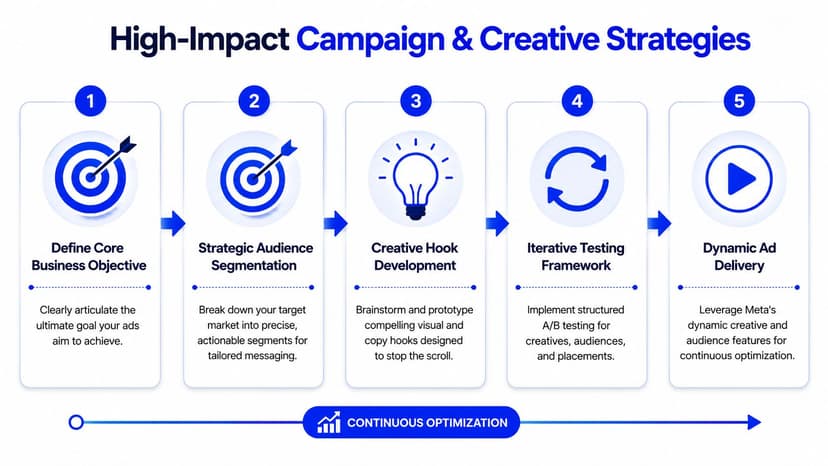
Simplify the account before you optimize it
Jon Loomer's analysis of a simplified Meta ads strategy makes the case clearly: fewer campaigns, broader delivery settings like Advantage+ Audience and Advantage+ Placements, and less manual interference often outperform fragmented setups built around tight control (Jon Loomer on simplified Meta ads strategy).
That matches what I've seen across lead gen and ecommerce accounts. Once an agency inherits an account with too many campaigns chasing the same outcome, performance usually suffers in predictable ways. Budget gets split across overlapping tests. Learning resets too often. Reporting gets messy because nobody can explain why five structures exist for one offer.
Watch for these patterns:
- Audience fragmentation: Ad sets are sliced into segments too small to produce stable learning.
- Placement micromanagement: Manual placement rules limit delivery without a strong reason.
- Overlapping paths to the same conversion: Multiple campaigns target the same buyer with minor structural changes.
- Thin budget distribution: Spend is spread across too many experiments at once.
The trade-off is real. Consolidation gives Meta more room to find conversions, but it also reduces the illusion of control that many clients and junior buyers are used to. Agencies need a way to explain that change in plain language and then report against it. “We reduced campaign count from eight to three so the system could learn faster” is much easier to defend than a maze of legacy tests nobody wants to own.
Stop splitting angles into isolated ad sets
A lot of agencies still test creative angles with one ad set per message. That made sense in older account structures. In many current accounts, it slows down learning and creates weak readouts.
Leadenforce argues that creative angle matters more than format and that agencies often get better stability by consolidating multiple angles for the same offer inside one ad set, instead of forcing each angle into its own silo (Leadenforce on creative angle strategy).
That approach works best when the audience and conversion goal are the same. If the offer is identical and the only variable is how you frame the value, keep those angles competing in the same environment. You get a clearer picture of which message can win under normal delivery conditions, and your reporting gets cleaner because you are evaluating message performance instead of structural bias.
Field note: Early angle isolation often answers the wrong question. It shows which ad set had the best conditions, not which message had the strongest market pull.
There are exceptions. Separate ad sets still make sense when an angle points to a different landing page, targets a meaningfully different segment, or supports a different stage of the funnel. The mistake is treating isolation as the default.
For creative production, platform-specific habits still matter. Facebook is not TikTok, but hook speed and pacing travel well across channels. Picjam's data-backed ad lengths are useful as a creative reference point when your team is reviewing whether an ad gets to the point fast enough.
Creative rotation should follow evidence
Agencies waste a lot of time replacing ads that are still doing their job. They also leave stale creative running too long because nobody set a rule for what counts as fatigue.
A better system is operational, not emotional. Keep a small rotation plan tied to metrics your team already reports on: spend, frequency, CTR trend, CPA trend, conversion rate on the landing page, and lead quality or revenue where available. If one metric slips for a day, hold. If several degrade together over a meaningful window, refresh the asset or test a new angle.
Here's the standard I use with teams:
| Decision area | What tends to work | What usually fails |
|---|---|---|
| Campaign count | Consolidated campaigns with clear objectives | Overbuilt structures with overlapping intent |
| Audience setup | Broad targeting with strong creative and conversion signal | Excessive exclusions and constant manual narrowing |
| Creative testing | Multiple message angles tested in the same ad set when the offer is the same | Defaulting to one angle per ad set |
| Rotation cadence | Refreshing creative after clear performance decline | Rotating because the team is tired of the ad |
This matters more in agencies than in single-brand teams. One account can survive messy creative decisions for a while. Twenty accounts cannot. The process has to be simple enough to repeat, clear enough to explain in a client call, and structured enough to show what changed in the report.
Creative quality still sets the ceiling. Weak messaging can make a good media buyer look average. Strong messaging gives broad targeting and simpler account structures a chance to work. That is why Oviond's perspective on the importance of content in social media marketing belongs in the conversation when paid social performance starts slipping.
Proving Value at Scale: The Agency Bottleneck
A client asks a fair question on a monthly call. Meta shows one result. GA4 shows another. The spreadsheet your account manager built last quarter shows a third number. Nobody is lying, but now the conversation is about reconciling platforms instead of explaining what changed in the account and what happens next.
That is the agency bottleneck with Facebook Ads. Optimization work can be solid and still feel unconvincing if reporting is slow, inconsistent, or impossible to defend across a growing client base.

Manual reporting cuts into margin and credibility
The pattern is familiar in agencies with more than a handful of paid social clients. One person exports Meta data. Another pulls GA4. Someone checks spend against the client invoice. Then the account lead builds a story from disconnected screenshots, spreadsheet tabs, and notes from Slack. By the time the report is ready, the team has spent hours on production work that the client never agreed to pay for.
TapClicks explains the operational problem well in its overview of marketing agency reporting tools. Manual reporting creates delays, fragmented data, and more room for errors across platforms like Google Ads and Facebook Ads. In practice, that shows up in four places:
- Late reports: The team is still compiling numbers near the deadline.
- Inconsistent formatting: Each account manager presents performance a different way.
- Weak explanations: Too many metrics obscure the few that matter.
- Confidence issues: A single bad number can overshadow strong campaign work.
Clients rarely complain about reporting because they love dashboards. They complain because reporting is where they decide whether your agency is in control.
Scale fails first in operations, not media buying
A single-brand team can survive messy reporting for a while. Agencies cannot. Once client count grows, every manual step multiplies across accounts, account managers, and reporting cycles.
I have seen this happen in otherwise strong agencies. The media team improves CPA. The creative team fixes fatigue faster. Performance is heading in the right direction. Yet the account team still dreads month-end because every client needs a custom explanation built from scratch. That is how decent ad performance gets buried under bad delivery.
PR Newswire covered broader pressure on agencies, including skill shortages and rising complexity in analytics work, in its report on the triple threat facing marketing agencies. The practical takeaway is simple. Agencies cannot depend on a few experienced staff members who know how all the spreadsheets connect. Those people become the approval layer for every report, every discrepancy, and every client question.
That creates a growth ceiling fast.
Agencies usually lose margin in repeated reporting labor that nobody scoped, priced, or systemized.
Standardization is what lets optimization scale
The fix is not more reporting effort. It is less variation.
Agencies need a fixed reporting cadence, a fixed KPI structure, and a fixed review process that still leaves room for client-specific context. That is the trade-off. Fully custom reporting sounds premium, but in many accounts it produces noise, inconsistency, and extra labor without better decisions. Standardized reporting is less flashy and far more useful.
For Facebook Ads, that usually means separating three things clearly:
- Outcome metrics the client cares about, such as leads, purchases, qualified pipeline, or revenue where you can get it.
- Efficiency metrics your team uses to judge optimization quality, such as CPA, ROAS, CTR, or landing page conversion rate.
- Diagnostic context that explains variance, such as tracking changes, creative refreshes, spend shifts, or attribution differences.
When those layers are clear, the report stops being a data dump. It becomes proof of work, proof of progress, and a record of decisions.
A good starting point is to review examples of automated marketing reports for agencies and build your delivery model around what repeats cleanly across accounts. That is how Facebook Ads optimization turns into an agency system instead of a monthly scramble.
Building Your Automated Reporting Engine with Oviond
A common agency scene looks like this. The media team has done the work. Campaign structure is cleaner, creative tests are running, costs are trending the right way. Then reporting week hits, and the account manager is still chasing screenshots, fixing broken formulas, and rewriting the same explanations across six client decks.
That is not a Facebook Ads optimization problem. It is an operations problem.
Oviond helps agencies turn reporting into a repeatable system instead of a monthly rescue job. The fit is straightforward for teams managing multiple clients who need white-label delivery, branded dashboards, scheduled reports, and one place to view Facebook Ads beside GA4, search, CRM, and the rest of the stack.
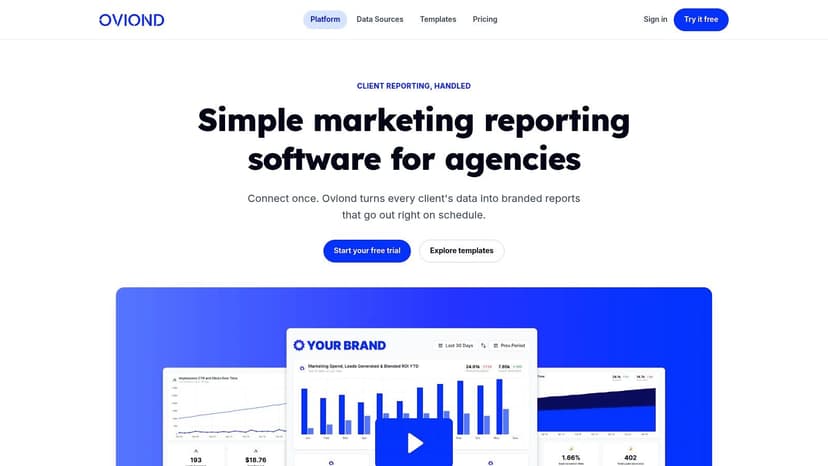
Start with the Metrics Clients Care About
A reporting engine breaks when the template tries to show everything. Agencies do this for understandable reasons. The data is available, the platform can display it, and nobody wants to leave out something that might matter. In practice, that creates bloated reports clients skim once and ignore.
The better approach is selective. Whatagraph on agency reporting tips makes the same point through the Pareto Principle. A small set of metrics usually drives the conversation and the decision-making.
For Facebook Ads accounts, the client-facing layer is usually compact:
- Primary outcome KPIs: leads, purchases, booked calls, pipeline, or revenue if the tracking is reliable
- Efficiency KPIs: CPA, ROAS, conversion rate, and cost per result
- Context notes: what changed, what was tested, and what the team is doing next
That structure keeps the report useful. It also keeps it scalable. If every account gets a custom metric maze, delivery gets slower, QA gets harder, and account managers end up explaining the report instead of using it.
HubSpot marketing statistics reinforces a point agency teams already know from day-to-day work. Lead generation remains a stubborn problem for many marketers. For lead gen clients, reporting should stay tied to lead volume, lead quality, acquisition cost, and follow-up action. The rest belongs in a supporting view, not the headline summary.
Build one reporting system, then clone it
The operational win comes from standardizing the build. Oviond supports Facebook Ads, GA4, Google Ads, LinkedIn Ads, email platforms, CRMs, and 70+ marketing data sources. It also gives agencies branded dashboards, automated delivery, custom domain setup, unlimited reports, unlimited dashboards, and unlimited users under one plan priced by client count.
Those details matter because they remove the friction that slows delivery as the client roster grows.
Set it up like an operator:
Connect the sources that settle the client conversation. Start with Facebook Ads, then add the source the client trusts most for validation, usually GA4 or CRM data. Oviond's guide to introducing Facebook Ads to Oviond is the practical first move.
Create a default paid social template. Build one monthly report and one live dashboard that cover the reporting pattern you use across most accounts. Then duplicate it and adjust only where the client model differs.
Apply your brand layer early. Add agency branding, client-facing URLs, and your preferred email sender setup before rollout. If you wait until later, rework piles up.
Use goals and calculated metrics with restraint. Goals are useful because clients can immediately see whether results are on track. Calculated metrics are useful when they simplify interpretation. Both become a mess if the dashboard turns into a math experiment.
Automate delivery on a fixed cadence. Monthly means monthly. Not “when the team gets to it.” Consistency matters almost as much as the numbers inside the report.
Operating rule: Standardize the framework. Customize the commentary.
That is the trade-off I would make every time. Agencies do need room for account-specific nuance, especially for attribution gaps, sales cycle differences, and client-side issues. But the delivery system itself should stay boring. Boring systems scale.
Oviond also includes its MCP server, which can help a compatible external AI tool speed up dashboard production during onboarding or rebuilds. It does not replace judgment. Someone on the team still needs to decide which metrics belong in the main view, what requires explanation, and when the story behind the numbers matters more than the numbers themselves.
A short product walkthrough helps show how that setup looks in practice:
Agency reporting solutions at a glance
No reporting stack fits every agency. Ultimately, the decision is usually about workflow tolerance. How much setup does your team want to own? How much white-label control do clients expect? How many accounts can the team support before reporting starts eating margin?
| Feature | Oviond | Looker Studio | Spreadsheets | Other Tools (e.g., AgencyAnalytics) |
|---|---|---|---|---|
| Agency-native setup | Built for agency client reporting workflows | Flexible, but often more setup-heavy | Familiar, but manual | Varies by platform |
| White-label delivery | Yes, including branded dashboards and custom domain options | Possible with extra workarounds | Limited and manual | Usually supported to some degree |
| Multi-client scaling | Strong fit for recurring client reporting across many accounts | Can become messy as account count grows | Hard to manage cleanly | Often solid, depends on pricing and limits |
| Unlimited reports and dashboards | Yes | No native concept in the same agency-friendly way | Technically yes, operationally messy | Varies |
| Unlimited users | Yes | Managed through separate access structures | Shared files create control issues | Varies |
| Pricing model | One plan with pricing by client count | Tool is low-cost, setup and maintenance cost can rise | Low software cost, high manual overhead | Usually tiered by features, users, or accounts |
| AI-assisted setup | Yes, with AI/MCP-assisted setup | Limited by comparison | No | Varies |
Looker Studio still makes sense for agencies that want highly custom builds and have the internal discipline to maintain them. Spreadsheets still hang around because they are familiar and cheap. Other reporting tools can work well too.
The practical difference is operating overhead. Oviond is built around agency delivery from the start, which makes it easier to keep reporting branded, repeatable, and manageable across a growing client base.
Automate the mechanics, keep the interpretation human
Strong agencies do not win retention by sending dashboards alone. They win by pairing reliable reporting delivery with clear interpretation.
A reporting workflow that holds up over time usually includes four habits:
- Automated data collection so the team is not pulling platform exports by hand
- Scheduled report delivery so clients receive reporting on time without end-of-month scrambling
- Human commentary so clients understand what changed, why performance moved, and what happens next
- Exception review so the team spends attention on accounts that need intervention, not on accounts that just need a report sent
That is what makes an automated reporting engine useful at scale. It gives agencies a system for proving optimization work across dozens of accounts without turning every reporting cycle into custom production work.
Conclusion From Optimized Ads to A Scalable Agency
Agencies that grow well don't just optimize Facebook Ads better. They operationalize the whole loop.
First, they fix measurement so Meta gets cleaner signals. Then they simplify campaign structure and creative testing so the algorithm has room to work. After that, they solve the part that usually gets ignored until it becomes painful: proving results consistently across a growing client base.
That's the key separation point. Plenty of agencies can manage ad accounts. Fewer can do it while maintaining clean white-label client reporting, on-brand delivery, and a reporting process that doesn't collapse as more clients come in.
If your team is still handling recurring reports with spreadsheets, copied screenshots, and last-minute exports, the media work will keep outrunning the system around it. That hurts profitability, client confidence, and your ability to scale.
A scalable agency needs two disciplines. Strong optimization. Strong reporting operations. When those work together, client reporting stops being a monthly scramble and starts becoming part of how the agency retains accounts and grows.
If you're ready to replace spreadsheet sprawl and dashboard chaos with white-label, multi-client reporting built for agencies, take a look at Oviond. It gives agencies branded dashboards, automated delivery, custom domain support, unlimited reports and users, 70+ integrations, and AI-assisted setup in one plan. It's a simpler way to run client reporting as your roster grows.
Related articles
Simplify marketing reporting today
Stop juggling multiple tools. Start presenting clear, automated reports your clients will love