
Oviond Blog
Marketing Reporting Software for Agencies: A Practical Guide
Discover how marketing reporting software helps agencies automate client dashboards, deliver branded reports at scale, and replace spreadsheet chaos in 2026.

Monday morning starts the same way for too many agencies. An account manager is hunting for screenshots, someone else is exporting CSVs from three platforms, and the ops lead is rebuilding a deck that looked almost identical last month, except the numbers changed and the formatting broke again.
That's the core problem marketing reporting software solves for agencies. It's not there to make charts prettier, it's there to stop the weekly report rebuild, keep client-facing numbers current, and let your team spend less time stitching data together and more time talking to clients about what to do next. In a category built on fragmented data, that matters, because modern tools connect from hundreds to 10,000+ data sources and replaced the old channel-by-channel routine with automated cross-channel reporting, a shift TapClicks describes as moving from manual exports to unified dashboards across traffic, conversions, revenue, and ROI, with connectors that now span everything from GA4 and Google Ads to Meta, LinkedIn, Microsoft Ads, Mailchimp, and Search Console TapClicks on agency reporting tools.
Table of Contents
- The Monday Morning Report Problem
- What Marketing Reporting Software Does
- Data Connections and Why They Matter
- Features Agencies Should Evaluate Before Buying
- How Oviond Compares to Other Reporting Tools
- Onboarding a New Client in Your First Week
- ROI and the True Cost of Reporting Software
- Common Questions Agencies Ask Before Switching
The Monday Morning Report Problem

The spreadsheet pile-up usually hits before the first coffee wears off. Five account managers each need the same client inputs, but every client has a different mix of ad platforms, analytics, CRM data, and email metrics, so each report turns into a small reconstruction project. The output still lands as a polished deck or PDF, but the work underneath is messy, repetitive, and easy to break.
That's why the category exists in the first place. Marketing reporting software is meant to retire the weekly rebuild, not decorate it, and the market has clearly moved in that direction. Modern client reporting software commonly schedules data pulls, applies branding, and ships either a live dashboard or emailed report, which is a long way from the old monthly hand-assembled pack Swydo on client reporting software.
For an agency, the pain isn't abstract. Every manual refresh means more time spent checking whether the numbers match across platforms, more time fixing charts, and more time fielding client questions about why the same KPI looks different in two places. The software promise is simple, fewer hours on assembly, more hours on client conversation.
Practical rule: if a report takes longer to rebuild than to discuss, the process is already too manual.
That's also where scaling gets ugly. A workflow that feels tolerable with five clients becomes a daily tax at twenty, and a real operational problem by fifty. The difference between a deck that gets rebuilt and a branded report that keeps itself current is the difference between an agency that feels busy and one that feels in control.
Common reporting mistakes to avoid are usually the same mistakes that force teams back into spreadsheets, mismatched sources, inconsistent formatting, and no clear delivery process.
What Marketing Reporting Software Does
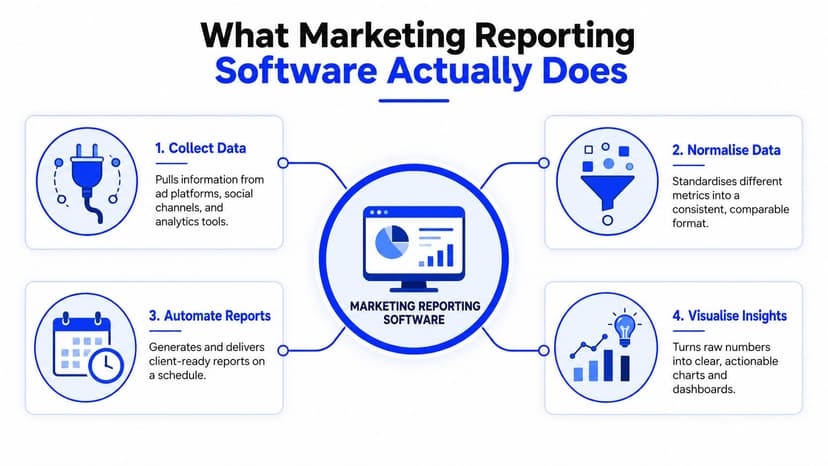
Marketing reporting software does four jobs, and agency-grade tools handle all four without forcing your team to babysit the process.
It collects data from connected channels
First, it pulls data from the platforms your clients use. That usually means GA4, Search Console, Google Ads, Meta Ads, LinkedIn Ads, Microsoft Ads, Mailchimp, and ecommerce systems. By 2026, the serious tools in this category were connecting to hundreds to 10,000+ data sources, which shows how fragmented the marketing stack has become TapClicks on agency reporting tools.
It normalises the data before you see it
Raw exports do not line up cleanly. One platform says cost, another says spend, another handles attribution windows differently, and the numbers will not match unless the software reconciles them first. Strong tools automate ETL and standardise those fields so a blended KPI chart is defensible, not just convenient to look at Improvado on marketing reporting software.
It presents the numbers in dashboards and reports
Once the data is aligned, the platform turns it into dashboards, charts, scorecards, and client-ready reports. Agency teams stop wasting time in tabs and start using one shared view for traffic, conversions, revenue, and ROI. The output does not need to be flashy, it needs to be easy to scan and hard to misread.
It delivers on a schedule with branding
The last job is delivery. Modern tools support scheduled sending, white-label styling, branded dashboards, and link-based sharing so the report arrives looking like it came from your agency, not from a software vendor. That matters because the client experience is part of the product.
The right platform does not just show numbers. It turns a messy data pile into a repeatable client process.
If a tool cannot do those four jobs, it is not replacing reporting work, it is just moving the mess somewhere else.
Data Connections and Why They Matter
The integrations page tells you almost everything you need to know about a platform, if you know how to read it. Agencies don't need a logo wall, they need proof that the tool can cover their actual client mix without falling apart once the sources are live.
Depth beats logo count
A native API connection to Google Ads or GA4 is one thing. A fragile CSV upload is another. The first can keep syncing, preserve field structure, and support automated reporting. The second turns every update into a manual task, which is fine for a hobby report and terrible for a client roster.
The same logic applies to breadth. If your agency works across SEO, paid media, email, and CRM, then you need connectors that cover those channels, not a platform that looks broad on paper but misses the systems your clients rely on. Oviond's data source overview shows the kind of multi-channel coverage agencies usually need when they're trying to keep one reporting layer across search, ads, analytics, and email.
How agencies shape raw data into useful KPIs
Good reporting software doesn't just connect sources, it gives you ways to shape them. The useful levers are pretty consistent:
- Prebuilt queries for common pull patterns that don't need custom setup.
- Custom queries for clients with unusual structures or source rules.
- Calculated metrics for blended KPIs that matter to the account team.
- Goals for tracking progress against the target, not just showing movement.
Those four pieces are what keep reporting from becoming a pile of disconnected channel stats. They also matter because channel exports often use different naming, attribution windows, and definitions, so cross-channel comparisons only make sense after the software standardises the data Improvado on marketing reporting software.
Practical rule: if you still have to explain every discrepancy by hand, the integration layer is too weak.
Agencies should also judge whether a tool helps them work with the data, not just store it. If the platform only supports shallow imports and a few formulas, it might be enough for a tiny client base. If you're managing recurring reporting across dozens of accounts, connection depth and transformation controls are the difference between a usable system and a reporting bottleneck.
Features Agencies Should Evaluate Before Buying
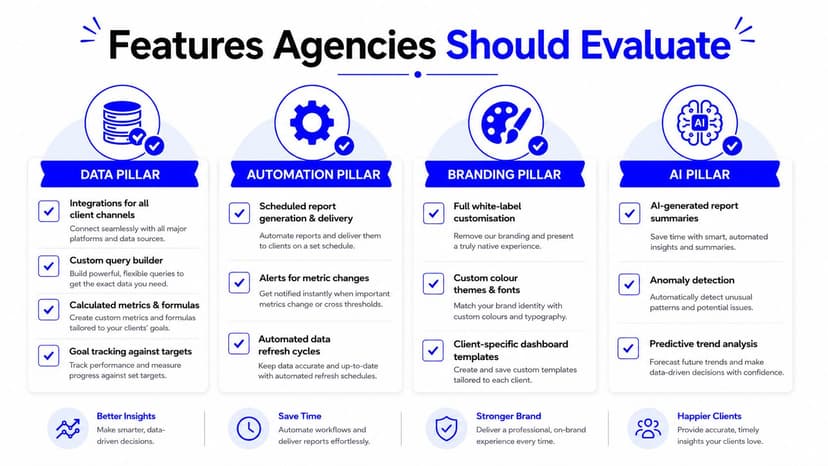
Agencies buying reporting software need to stay practical. Ignore the polished demo language and judge the tool on four pillars, data, automation, branding, and AI. Those are the pieces that decide whether the platform can keep working as reporting moves from a handful of clients to a full agency operation.
Data features that are critical
Start with the basics. You need strong integrations, custom queries, calculated metrics, and goal tracking. Those are the functions that let account managers compare clients in a consistent way without rebuilding logic for every account. Agency-focused buying guides keep landing on the same point, broad integrations and automation matter more than a long list of clever extras Metricswatch on agency reporting software.
Automation that removes human babysitting
Scheduled report delivery is the minimum. So is hands-off data refresh. If your team still has to remember who gets which report and when, the tool has not solved much. Report templates should also be cloneable per client, because the whole point is to standardise the process without making every account look identical.
Branding that makes the report feel client-ready
White-label styling is standard for agencies. Custom domains, custom email senders, and clean share links matter because clients notice whether the experience feels owned or rented. PDFs still have a place, but a shareable dashboard or branded link usually works better for recurring reporting because it avoids version chaos and keeps the numbers current.
AI that speeds up setup, not your decision making
AI should help build faster and summarise faster. MCP-assisted setup can reduce the friction of getting a dashboard together, and the AI tools your team already uses can help with summaries or anomaly spotting. Treat that as an accelerator, not a replacement for account judgment.
If a platform still feels clumsy when you create a new client, it will not get easier at fifty clients. The test is simple: can you set up a new account fast, brand it cleanly, and keep it on automatic delivery without digging through a support article every time?
Feature details for agencies are worth reading after you have checked those basics against your own workflow.
How Oviond Compares to Other Reporting Tools
Agency reporting tools sit in the same broad category, but they don't solve the same problem in the same way. The comparison should be about fit, not hype, because the wrong platform can be perfectly good software and still be the wrong operational choice for your agency.
| Tool | Data connections | White-label depth | Automation | Pricing model |
|---|---|---|---|---|
| Oviond | 60+ integrations, plus reusable queries and custom data handling | White-label delivery, custom domain support, custom email senders | Scheduled delivery, always-current dashboards, reusable templates | Single plan, pricing scales by client count |
| AgencyAnalytics | Broad agency-oriented connector set, strong for common marketing channels | White-label dashboards and client portals | Automated reports and client delivery | Per-campaign pricing |
| Whatagraph | Good coverage for standard agency channels | White-label reporting included | Automated multi-channel reports | Tiered pricing that scales with usage |
| Swydo | Solid agency reporting focus with common integrations | White-label client reporting | Scheduled reports and recurring delivery | Subscription pricing |
| Looker Studio | Flexible, especially with Google ecosystem and partner connectors | Limited native white-label depth | Automation depends on setup and connectors | Free core product, connectors and maintenance add complexity |
That table is the useful lens. If you have a data person on staff and want a free canvas, Looker Studio can still make sense. If you want a more agency-native reporting workflow without building every dashboard from scratch, the front-end agency tools are more sensible.
Oviond sits on the simpler side of that line. It's a white-label client reporting and dashboard platform built for agencies, with all features in one plan, pricing by client count, unlimited reports and dashboards, unlimited team users with no per-seat fees, 60+ integrations, and AI/MCP-assisted setup. That package matters because agency economics are not the same as BI economics, you care about client count, delivery consistency, and how painful it is to scale the next ten accounts, not just whether the platform can visualize anything at all.
The balanced takeaway is this. AgencyAnalytics is a practical fit if you want an all-in-one agency stack. Whatagraph and Swydo are credible options for recurring client reporting. Looker Studio still works when a team has the technical patience to maintain it. Oviond is the cleaner choice when the agency wants branded delivery, simpler setup, and pricing that tracks with the business, not the headcount.
Onboarding a New Client in Your First Week
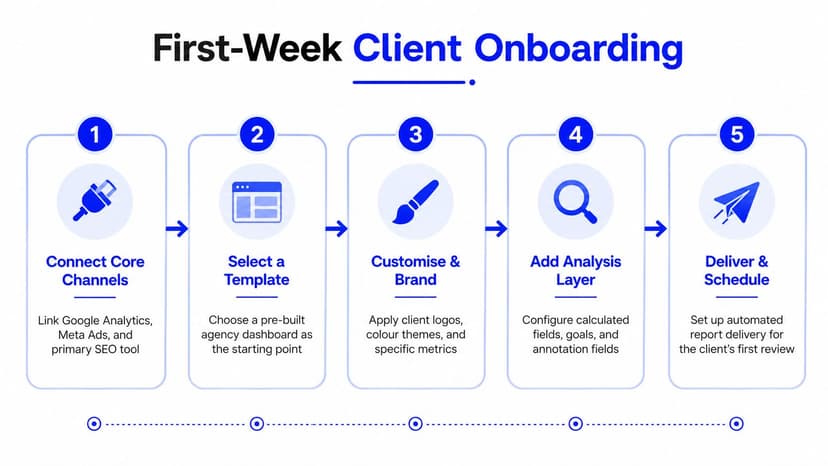
A good onboarding flow should feel repeatable, not heroic. The first week should be about getting a new account live without improvising every step, because improvisation is what turns reporting into a support queue.
Day one connect the core channels
Start with the accounts that already define the client's story, usually analytics, paid media, and search. Connect them first, then verify that the naming and access levels are clean. A messy auth setup on day one usually becomes a messier dashboard later.
Day two choose a template and lock the structure
Pick a prebuilt template that matches the client's channel mix. Then name the dashboard by client and reporting cycle so the account team can find it later without guessing. That small naming habit saves more confusion than people expect.
Day three add the client's actual KPIs
Now layer in custom metrics, goals, and the few charts the client asks about every month. Don't overload the build with vanity charts just because the platform makes them easy to add. Clarity wins over decoration every time.
Day four brand the delivery
Apply the logo, colours, and domain settings, then check the report from the client's point of view. The final view should feel like your agency owns the process end to end, not like a generic tool is doing the talking for you.
Day five schedule the first delivery
Set the first automated report and confirm the client knows when to expect it. At that point the workflow stops being a one-off build and starts becoming an operating rhythm.
Platforms that offer migration help and human support from the start reduce the risk of switching. That matters because the hardest part of a new reporting stack isn't creating the first dashboard, it's making sure the team can keep using it when the next client gets added.
ROI and the True Cost of Reporting Software
Agency owners usually ask the wrong ROI question first. They ask whether the tool is cheap. The better question is whether it removes enough manual work and avoidable admin to justify the line item.
Three buckets define the return
The first bucket is hours. Manual report building burns time every month, especially when the same decks are being recreated from scratch for clients with similar KPI sets. The second bucket is retention, because polished and on-time reporting is part of the client experience, and sloppy delivery makes the agency feel less in control. The third bucket is access cost, because per-seat pricing gets expensive fast when account managers, ops, and leadership all need visibility.
A fourth bucket sits underneath the others, operational consistency. If your team can standardize report delivery, onboarding new clients gets easier and client handoffs stop depending on whoever remembers the spreadsheet structure. That is the part agencies miss when they only compare sticker prices.
Pricing model matters more than list price
Oviond's pricing model is built around client count rather than per-seat access, with all features in one plan and unlimited team users included, so agencies do not have to choose between collaboration and cost control. That is the right structure for a multi-client shop, because agencies do not scale neatly by headcount. They scale by accounts, reporting cycles, and the amount of brand-safe delivery they need to maintain.
The category exists because the data problem keeps expanding. As noted earlier, reporting tools now connect to a wide range of data sources, and the workflow has shifted toward automated, client-facing delivery. Swydo on client reporting software makes the same point from a different angle, agencies are paying for less assembly and more consistency.
Practical rule: if access fees rise every time your team grows, the pricing model is fighting your agency, not helping it.
The usefulness of reporting software also comes down to efficiency, not just output. If a platform shortens the time between raw data and a client-ready report, it improves the economics of every account you manage. Measurement and efficiency context is the right place to judge whether the process is getting lighter for your team.
More than 3,000 agencies use a reporting model built around this kind of workflow, which is enough signal that the operating logic is not fringe. The point is not that every agency needs the same tool. The point is that once reporting becomes a client-facing system, the economics should support scale instead of punishing it.
Common Questions Agencies Ask Before Switching
How risky is migration from spreadsheets or Looker Studio? It's manageable if you treat it like a real project. The main work is reconnecting sources, recreating the core dashboards, and validating the numbers before the old workflow is shut off, not flipping a switch and hoping the reports stay consistent.
How deep does white-label need to go? Deeper than a logo swap. Agencies should look for custom domains, branded dashboards, and custom email senders so the delivery feels like it came from the agency, not from a generic platform.
Why does pricing by client count matter? Because agencies bill and scale by account, not by seat. Per-seat pricing punishes collaboration, while client-based pricing makes it easier to add account managers and ops staff without turning reporting into a license negotiation.
What does AI and MCP-assisted setup change? It speeds up setup and reduces friction. The useful version of AI in reporting helps build dashboards faster, summarize patterns, and keep account managers from starting from a blank page every time.
If your agency is still rebuilding monthly reports by hand, Oviond is built for the part of the job that keeps slowing you down, client-facing delivery, branded dashboards, and reporting that doesn't collapse as your roster grows. Visit Oviond and see how agency reporting that finally feels simple can fit into your workflow.
Related articles
Simplify marketing reporting today
Stop juggling multiple tools. Start presenting clear, automated reports your clients will love