
Oviond Blog
White Label SEO Reporting Tool: Agency Guide 2026
Discover how a white label SEO reporting tool can streamline client reporting and boost your agency's efficiency in 2026.

End-of-month reporting is where agency calm goes to die. Someone is pulling screenshots from Google Analytics, someone else is chasing Search Console numbers, and account leads are still fixing branding in a deck that should've been done yesterday. If you've ever sent a client a report that looked half in-house and half like a vendor export, you already know why the white label SEO reporting tool category exists. It's not a nice-to-have branding layer, it's the thing that keeps recurring client reporting from turning into a monthly fire drill.
Table of Contents
- The Monthly Reporting Grind Every Agency Knows
- What a White Label SEO Reporting Tool Actually Does
- Feature Checklist Every Agency Should Run Through
- How Oviond Fits an Agency Reporting Workflow
- Spreadsheets vs Looker Studio vs Dedicated Tools
- Common Pitfalls When Choosing a Reporting Tool
- A Short Selection Framework for Agency Leads
- FAQ on White Label SEO Reporting Tools
The Monthly Reporting Grind Every Agency Knows
The pain usually shows up at the same time every month. One account manager is copying keyword rankings into slides, another is updating charts in a spreadsheet, and the ops lead is checking whether the client logo is still the old one because somebody duplicated the wrong template again. That's the cost of manual reporting, not just the time spent building it, but the version chasing, the rework, and the awkward moment when the report looks less polished than the service behind it.
Agencies don't need another way to make reporting look prettier. They need a system that keeps the work from restarting every month.
Practical rule: if every client report starts with screenshots, exports, and a blank template, you're still doing reporting by hand, even if the deck looks polished at the end.
A white label SEO reporting tool exists to replace that cycle with a repeatable client reporting process. It pulls from live sources, keeps the agency's branding intact, and lets recurring reports move on a schedule instead of waiting for someone to assemble them. The shift matters because recurring reporting is never just about the report itself. It's about whether your team can support more clients without building the same thing from scratch over and over.
If you're still deciding whether the current setup is the problem, the clearest starting point is comparing manual reporting against automation in practice. This breakdown of manual reporting versus automated digital marketing reporting is a useful gut check for any agency that's spending too much of the last week of the month inside spreadsheets.
What a White Label SEO Reporting Tool Actually Does
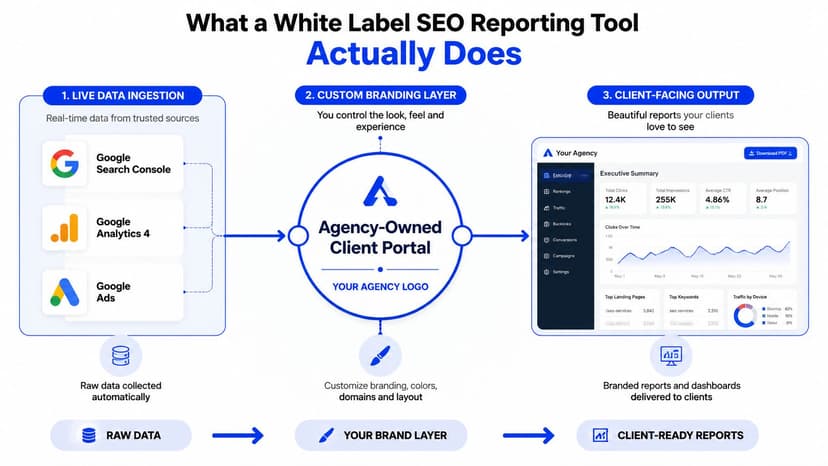
A white-label SEO reporting tool is not just a dashboard with a logo on it. It's a client-facing packaging layer on top of live search and analytics data, so the agency owns the look, the feel, and the delivery. The software may be doing the heavy lifting in the background, but the client sees an in-house report wearing your agency's uniform, not the vendor's badge.
The core idea is simple. Bring the data together, brand the presentation, and deliver it under your own domain or identity. That's why the category usually combines Google Analytics, Google Search Console, rank tracking, site audits, backlink data, and sometimes adjacent marketing channels into one branded view. A solid introduction to SEO reporting concepts is available in this guide on what SEO reporting is, but the agency-specific difference is ownership of the client experience.
What belongs inside the report
The report should surface the metrics clients ask about, including organic traffic, keyword rankings, impressions, clicks, CTR, and conversions, all presented under the agency's colors, logo, and domain. White-label reporting is defined by that removal of vendor branding, with agency-focused tools also supporting custom headers, footers, and client-ready styling. That's the point. A generic export tells a client the platform made the chart. A white-label report tells them your team owns the relationship.
The best mental model is this. Raw data comes in, the agency's brand layer shapes it, and the client gets a report that looks like it came from your own internal system. Modern platforms now support automated refresh and scheduled delivery, which is why many agencies treat this as a reporting operating layer rather than a design feature. The category has also grown beyond narrow SEO snapshots, with leading tools advertising 30+ integrations and others citing 50+ connections, showing how quickly client reporting has expanded into broader marketing intelligence workflows. That growth is documented in this white-label SEO overview.
A report should answer one question fast, what changed since the last check-in, without making the client dig through vendor clutter.
Feature Checklist Every Agency Should Run Through
A reporting tool that looks polished but still needs manual cleanup every month is a bad buy. Agencies should start with the work the team repeats under deadline, then check whether the platform removes it. If the tool cannot pull from Google Analytics 4 and Google Search Console without CSV uploads or constant patching, the rest of the feature list does not matter yet. Native connectors keep automation intact and stop version drift, which is the whole point of switching away from a stitched-together workflow. The reporting checklist in this white-label report automation guide makes the same practical case, agencies win by cutting repeat setup, not by adding another layer of manual work.
Before you sign, run the tool through this checklist.
| Capability | What to Verify | Why It Matters for Agencies |
|---|---|---|
| Live data connections | Native connectors for GA4, Search Console, and other client channels | Avoids CSV chaos and stale numbers |
| White-label controls | Logo, colors, headers, footers, and custom domain support | Makes the report look fully in-house |
| Multi-client structure | Separate workspaces or client-level organization | Keeps dozens of accounts from turning into a mess |
| Automated delivery | Scheduled reports and live dashboard links | Removes monthly sending chores |
| Templates and reusable assets | Prebuilt layouts, query templates, saved components | Cuts repeat setup across clients |
| Calculated metrics and goals | Custom math, targets, and benchmarks | Standardizes how you report outcomes |
| API access | Full API or extensibility options | Helps when the agency needs custom workflows |
| Team collaboration | Shared access without per-seat fees | Avoids growth penalties as the team expands |
That checklist only works if you also watch the pricing model. Per-client pricing, seat fees, and report limits can turn a decent tool into a monthly margin leak. Agencies should check the cost structure before the demo ends, not after the first busy reporting cycle. A practical comparison of common reporting inputs is laid out in important SEO metrics to keep track of, which is the kind of reference that helps teams decide whether the platform supports the numbers clients ask for.
The bigger question is simple. Does the tool scale with the agency, or does it charge for every new account, user, or report until the workflow becomes expensive enough to fight? The white-label reporting market is full of products that look similar at first glance but split hard on economics, and this 2026 comparison write-up shows how often the cost surprises show up only after the team is already committed. Some tools bill per client, some hide white-labeling behind paid add-ons, and some make scale painful in ways that only show up once reporting volume climbs.
Use a blunt test. If a feature is necessary for the monthly reporting process but lives behind a higher tier, that is not a reporting platform built for agency operations. It is a rental agreement with better branding.
How Oviond Fits an Agency Reporting Workflow
The cleanest agency workflow is boring in the best way. Connect the client's sources once, build the dashboard from a template, then let delivery run on its own. That's the model Oviond uses for agencies, with live dashboards, branded reports, template-driven setup, and white-label delivery built into the process rather than bolted on later. It also supports 60+ integrations, unlimited reports, unlimited dashboards, and unlimited users, which matters because agencies don't need another tool that charges extra every time the team or client list expands.
The setup pattern is straightforward. Start with a prebuilt template for SEO or digital marketing, map in the client's sources, then reuse the same queries and calculated metrics across similar accounts. That's the big win, not flashy design, but standardization. When your agency reports on the same core KPIs for ten clients, reusable assets stop every account from becoming a custom project.
What changes in day-to-day work
Spreadsheets force every report into manual assembly. Looker Studio can work for internal analysis or one-off views, but once clients expect branded delivery on a schedule, the process often turns into template maintenance and connector babysitting. A dedicated reporting tool is built to take that recurring load off the team, especially when it supports custom domains and custom email senders so the client-facing experience stays consistent.
The platform side also matters. Oviond's model is one plan with all features, pricing by client count, and team access without per-seat fees. That structure lines up with the way agencies grow, because adding a client shouldn't force you to renegotiate the reporting stack every time the roster changes. It also includes AI and MCP-assisted setup, so teams can get dashboards and reports moving without treating every build like a fresh technical project.
One practical recommendation, start with the smallest repeatable client template you have and make it your standard. Once the layout, queries, and goals are fixed, scaling is mostly duplication, not reinvention.
The video below is useful if you want to see the workflow in a more visual form.
Human support and migration help also matter more than teams admit. When an agency is moving off spreadsheets or a half-built dashboard stack, setup speed isn't just convenience, it's the difference between a clean switch and another quarter of “temporary” reporting hacks. Oviond's looker studio alternative page is worth a look if your team is deciding whether to keep patching free tools or move to something built for recurring client delivery.
Spreadsheets vs Looker Studio vs Dedicated Tools
Spreadsheets still make sense for one-off audits, quick internal analysis, or situations where a strategist wants to test a metric before formalizing it. Looker Studio is useful when you need flexible visualisation and your team is comfortable maintaining connectors and layouts. The problem starts when those tools become the main client reporting system, because recurring delivery is where manual upkeep becomes the primary product.
Where each setup fits
Manual spreadsheets are good for isolated tasks, but they break down when branding, freshness, and repeatability all matter at once. They're also easy to version-bundle into a mess, especially when three people touch the same file before the report goes out.
Looker Studio gives agencies a free dashboard layer, and that's useful. The catch is that free dashboards often still need a lot of handholding, especially when the client expects a polished, branded experience across many accounts. It can absolutely work, but it's closer to a flexible internal tool than a complete agency reporting system.
Dedicated tools are what you move to when reporting has become an operations problem. The point isn't that they make analysis smarter, it's that they make delivery sustainable. The stronger platforms handle branding, scheduled delivery, reusable templates, and multi-client organization in one place, which is exactly why they're used as the client-facing layer rather than just another place to chart numbers.
If a setup needs a hero every month, it's not a system yet.
The category has also widened well beyond SEO alone. Independent tool roundups cite integrations across Google Ads, Facebook/Instagram, LinkedIn, Mailchimp, and HubSpot, and one roundup explicitly claims 80+ integration connections, which shows why agencies are using these tools as multi-channel reporting hubs rather than narrow SEO widgets. That broader stack matters, because client reporting usually fails when SEO lives in one tab and everything else lives somewhere else.
The right choice depends on how often the report goes out and how many clients are waiting on it. One-off work can survive in spreadsheets or free dashboards. Recurring agency reporting usually can't.
Common Pitfalls When Choosing a Reporting Tool
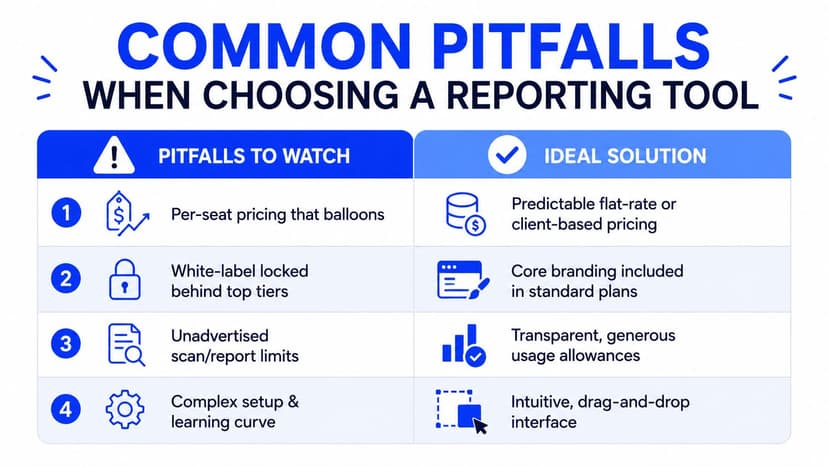
The most common mistake is buying reporting software as if it were a branding decision. Agencies end up with a polished interface and an operating model that breaks under client growth. The key traps are economic and structural, especially when pricing, branding, and usage limits do not match how the agency scales. Some tools charge per client, some treat white-labeling as an add-on, and some cap usage in ways that turn growth into a cost spike instead of a normal next step.
What to watch before you commit
- Per-seat pricing that balloons: If every new account manager raises the bill, the software is taxing team growth instead of supporting it.
- White-label locked behind top tiers: If custom domains or branding only show up later, the client experience is being held hostage by the pricing page.
- Hidden report or scan limits: If limits are not obvious early, you will find them after your client list is already locked in.
- Static PDFs with no live layer: They go stale the moment you send them, and someone still has to rebuild the next version.
The better buying standard is straightforward. Pricing should stay predictable as the client count grows, branding should be available without a painful upgrade path, and the reporting layer should support live delivery instead of turning every send into a one-time artifact. This agency-focused guide on white-label SEO reporting asks the right question, whether the branded report helps clients understand and act on the data, not just whether it hides the vendor name.
One more mistake is choosing a tool that looks cheap on the pricing page but gets expensive in the workflow. Per-client fees, seat fees, report limits, and scan caps hit the budget in different ways, and agencies usually feel the pain only after onboarding a few more accounts. A comparison chart outlining common pitfalls to avoid when choosing a white label SEO reporting tool. lays out those tradeoffs clearly. The clean test is operational. If the tool makes growth feel like a pricing event, it is the wrong tool. If it lets more clients slot into the same monthly process without extra handholding, you are in the right category.

A Short Selection Framework for Agency Leads
Use three questions. First, does the pricing stay predictable as the client count grows? Second, does the platform cover the channels you report on now and the ones you plan to add next? Third, can you fully own the client experience from login to PDF, without paywalling the brand layer?
What to verify in a trial
If pricing is client-based, ask what happens when you add a few more accounts and a few more users. If the tool offers white-labeling and a custom domain, verify that those controls are included where you'd use them, not hidden in a later upgrade path. If it claims broad coverage, test the current sources you rely on before you even look at the layout editor.
That's the lens I'd use whether you're comparing agency tools or deciding whether to stay with a duct-taped setup. Oviond is one option that matches those guardrails with white-label delivery, custom domains, client-based pricing, and all features in one plan, but the larger point is bigger than one product. The right reporting system should feel like a checkpoint each month, not a project that starts over every time the calendar turns.
FAQ on White Label SEO Reporting Tools
Does client-based pricing make more sense than per-seat pricing?
For agencies, usually yes, because reporting workload grows with client count, not just headcount. Per-seat fees can punish collaboration, while client-based pricing fits recurring delivery better.
What does migration help look like?
It should mean help moving templates, data connections, and recurring report structure off spreadsheets or free dashboards without rebuilding everything from scratch. If a vendor only gives you a login and a help center, that's not migration support.
Is branding alone enough reason to switch?
No. Branding matters, but the tool also has to reduce manual work, stay economical, and handle recurring delivery cleanly. If it only changes the logo and leaves the workflow broken, it's not solving the agency problem.
If your team is still stitching together reports by hand, Oviond gives agencies a cleaner way to handle branded dashboards, automated delivery, and multi-client reporting in one place. It's built for the agency workflow this guide describes, not a one-off analytics project, so monthly reporting stops feeling like a rebuild. Visit Oviond to see how that setup works for your client roster.
Related articles
Simplify marketing reporting today
Stop juggling multiple tools. Start presenting clear, automated reports your clients will love