
Oviond Blog
Client Portal for Marketing Agency: Build, Scale, and Retain
Discover how a client portal for marketing agency teams streamlines reporting, automates delivery, and keeps clients engaged with live, branded dashboards.

The 28th of the month has a way of exposing every weak spot in agency ops. Someone is chasing numbers in spreadsheets, someone else is fixing a broken Looker Studio link, and account managers are answering the same client question for the third time because the PDF they sent last week is already stale. When clients work across Google Ads, Meta, GA4, HubSpot, Shopify, and a stack of side tools, the problem usually isn't effort, it's that there's no single, client-scoped place where the current truth lives.
A client portal for marketing agency work solves that by becoming the delivery layer for reporting, approvals, and client communication. Not a loose folder of files. Not an internal PM board with a public link. A real portal gives each client a private, branded space where live campaign data, notes, and follow-ups sit together, and the same source-of-truth view keeps the “your numbers versus ours” argument from spiraling.
Table of Contents
- Why Your Monthly Reporting Process Is Breaking Down
- What a Client Portal Is for Agencies
- The Business Case for Switching to a Portal
- Essential Features Every Agency Portal Must Have
- Comparing the Leading Portal and Reporting Platforms
- Onboarding Clients to Your Portal in Seven Days
- How Oviond Delivers the Complete Portal Experience
- Where Agency Portals Are Heading Next
Why Your Monthly Reporting Process Is Breaking Down
The breakdown usually starts small. One analyst exports CSVs from ad platforms, another updates a slide deck, and account managers paste screenshots into an email thread because the client wants “something simple.” By the time the report is approved, the numbers have already moved, which makes the whole thing feel fragile.
That fragility gets worse as the client list grows. Agencies end up with disconnected data across Google Ads, Meta, GA4, and CRM tools, plus version-control confusion when the same dashboard gets edited by multiple people. The portal guidance from Scnsoft describes the modern answer clearly, a secure online hub where agencies and clients share files, updates, reports, and project information in one place, with live views pulling from media, search visibility, website performance, leads, pipelines, and won revenue Scnsoft's portal guidance.
The part clients feel first
Clients don't care that the team had a rough morning. They care that the number in the PDF doesn't match the number in their account login. Once those inconsistencies show up, every monthly report becomes a debate about trust instead of performance.
Practical rule: if the client has to ask where a number came from, the reporting workflow is already too manual.
A portal changes the frame. Instead of sending static files and hoping nobody asks for an update, agencies can show the live source, the last updated time, and the exact client-scoped view that belongs to that account. That's what makes the monthly scramble feel outdated.
What a Client Portal Is for Agencies
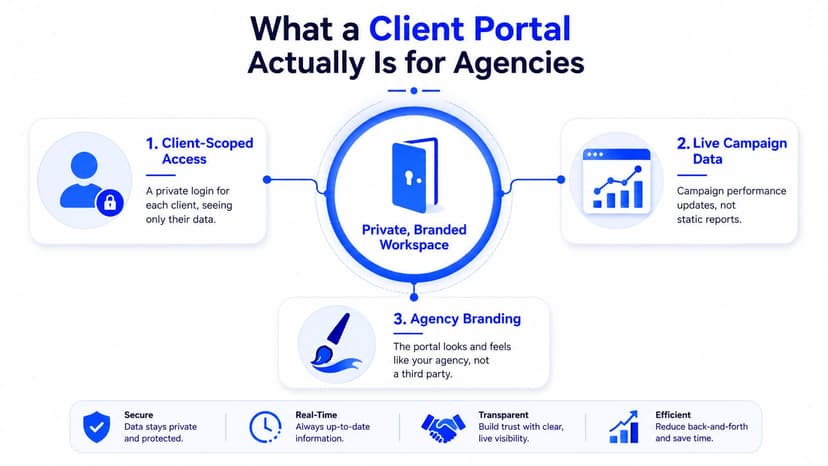
For agency work, a client portal is a private, branded workspace where each client signs in and sees only its own reporting, approvals, files, and messages. Assembly's definition matches how agencies use it, a permissioned layer for file sharing, task tracking, billing, approvals, and role-based access, rather than a loose shared space Assembly's portal overview.
That difference matters because an internal tool is not built for client-facing separation. Asana, Monday, or a general file folder can help your team stay organized, but they do not solve branded delivery or client-scoped visibility on their own. A true portal handles both, which is why it scales better once you move past a handful of accounts.
The three mechanics that matter
First is client-scoped access. Every task, file, and message belongs to one account, so clients never wander into another client's workspace or see internal noise they should not see.
Second is live campaign data. Marketing-specific portal guidance notes that dashboards can connect to Google Ads, Facebook Ads, GA4, HubSpot, and Shopify through OAuth or API keys, then refresh automatically instead of waiting for someone to rebuild an export Scnsoft's portal guidance.
Third is agency branding. Knack's client portal guide calls out custom branding, onboarding workflows, approvals, version control, and centralized document access as core portal mechanics, with the portal architecture planned around access and integrations first, rather than just a polished dashboard front end Knack's client portal guide.
The portal should feel like your agency's operating system for that account, not a vendor app with your logo pasted on top.
The Business Case for Switching to a Portal
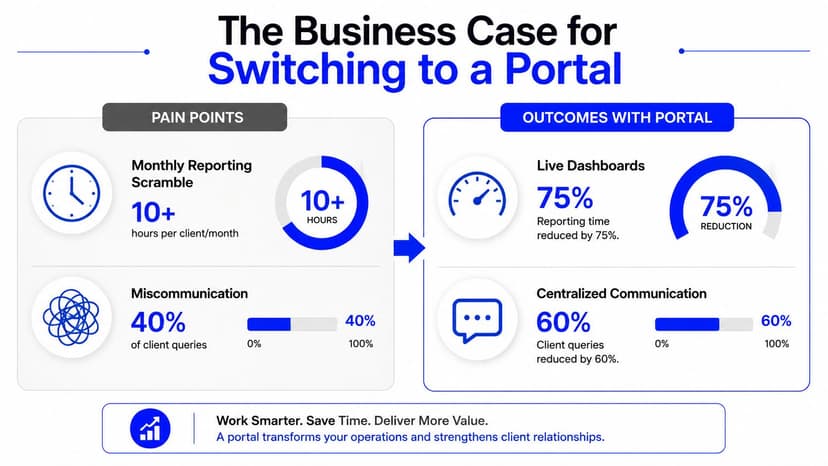
The operational case is easy to see once you've lived through enough month-end chaos. Live dashboards cut out the routine of rebuilding reports from scratch, and client-scoped access means people can check the numbers without waiting for a manual email. That alone changes the tone of the relationship, because the client isn't dependent on someone's inbox to understand what's happening.
The brand case matters too. White-label delivery makes the reporting experience feel deliberate, which reinforces the agency's value every time a client logs in. AgencyHubCo's guidance is blunt about this, a portal should be branded top to bottom, with the agency's logo and colors instead of the vendor's branding, and it should handle recurring retainers, approvals, feedback, and native messaging in the same client record AgencyHubCo's portal guidance.
That setup also changes retention dynamics. When clients can check their own numbers anytime, they're less likely to turn a softer month into a support escalation. They see continuity, context, and the history behind the work, which is a better place to have performance conversations.
A portal is also a pitch asset. If you're selling recurring work, showing a branded reporting experience makes the agency look organized before the client ever sees a dashboard.
See how Oviond approaches marketing reporting software
What changes in day-to-day work
The gain isn't abstract. Account managers stop being the middle layer for every status check. Clients use the portal for answers that used to sit in email threads, and the team can focus on interpretation instead of reformatting the same numbers every month.
Essential Features Every Agency Portal Must Have
The evaluation starts with white-labeling. If a platform can't support custom domains and branded sender details, it will always feel a little off to clients. That matters because branded delivery is part of the experience, not just decoration.
Next comes data coverage. One reporting platform advertises 85+ marketing platform integrations across analytics, paid media, SEO, PPC, social, and CRM sources, which shows how broad connector coverage has become a baseline expectation AgencyAnalytics portal feature page. An independent review also lists 250+ connectors for TapClicks, 150+ for NinjaCat, 80+ for AgencyAnalytics, and 50+ for Whatagraph, with live dashboards and scheduled reports treated as standard formats in client reporting software independent industry review.
What to check in a demo
- White-Labeling: confirm custom domains, branded dashboards, and branded email senders, not just a logo swap.
- Live Dashboards: make sure data refreshes automatically on a schedule you control, so the client sees current numbers.
- Automated Reporting: verify scheduled delivery works without manual exports.
- Secure File Sharing: check that documents stay inside the client's space.
- Role-Based Access: confirm you can control what each client and team member sees.
The drag-and-drop builder matters too, because agencies need to assemble dashboards without rebuilding every report in spreadsheets. Calculated metrics and goals are just as important, since clients rarely care about raw platform totals alone. They care about the targets tied to their business.
If a portal makes you choose between branding, automation, and access control, it's already asking you to compromise on the wrong things.
The last filter is team access. Unlimited users without per-seat fees remove a common growth tax, especially when account managers, strategists, and analysts all need visibility. If the pricing punishes collaboration, the portal will be harder to adopt internally.
Review Oviond's marketing dashboard features
Comparing the Leading Portal and Reporting Platforms
Agencies usually compare these tools on four things, integration breadth, white-label depth, automation, and scalability. The primary difference is how much manual work stays on your team after the first dashboard is built.
Looker Studio is familiar and flexible, especially for teams already working inside Google's ecosystem, but it often depends on manual setup and a patchwork of connectors. AgencyAnalytics, Whatagraph, and Swydo are built more directly for agency reporting, with stronger client-facing workflows and more packaged automation. Oviond sits in the same agency reporting category, with client-scoped portals, branded delivery, and an operating model that is built around separating each account cleanly instead of forcing everything through one shared dashboard.
| Platform | Integrations | White-Label Domain | Pricing Model | Unlimited Users |
|---|---|---|---|---|
| AgencyAnalytics | Broad agency-focused connector set, with 85+ integrations noted in the platform's portal materials AgencyAnalytics | White-label client portals offered AgencyAnalytics | Agency reporting subscription model | Not emphasized in the cited material |
| Whatagraph | 50+ connectors noted in the independent review industry review | White-label client portals offered in the review industry review | Agency reporting subscription model | Not emphasized in the cited material |
| Swydo | Positioned as an agency reporting tool in the comparison set | White-label delivery typically expected in this category | Agency subscription model | Not emphasized in the cited material |
| Looker Studio | Flexible, but often depends on manual connector work and external setup | Not a native white-label agency portal model | Free to low-cost workflow, depending on setup | Not the main selling point |
| Oviond | 60+ integrations across analytics, paid media, search, social, email, CRM, and e-commerce, plus AI-assisted setup via MCP server | Custom domains, custom email senders, and white-label delivery | Pricing organized around client count rather than a crowded seat-by-seat setup Oviond overview | Team access is not tied to per-seat fees Oviond overview |
The comparison comes down to how the work gets done. Some platforms are stronger for teams that want a familiar reporting layer and are willing to keep stitching pieces together. Others are easier to start with, but they create friction once more account managers, analysts, and clients need separate access. A useful shortlist should focus on branded delivery, automation, and clean client separation, then test how much admin time each platform still asks for in practice.
Onboarding Clients to Your Portal in Seven Days
The fastest way to kill adoption is to hand over a portal with no context. Clients need a clean first login, a visible reason to use it, and a simple explanation of what shows up there versus what still comes by email.
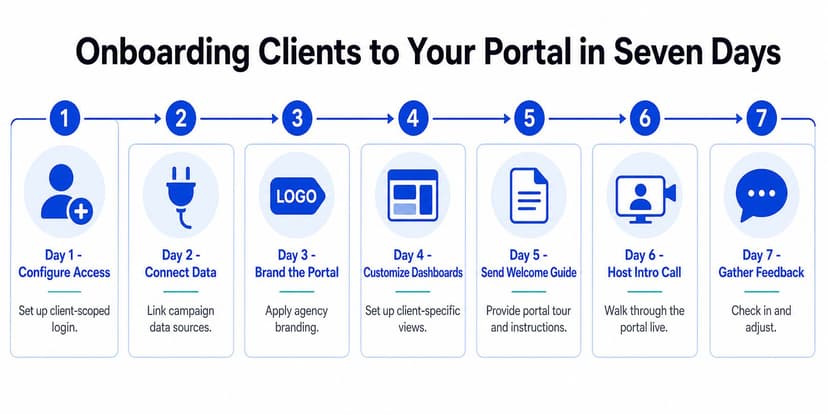
Day one is access. Set up the client-scoped login, connect only the data sources relevant to that account, and verify the client sees just their own workspace. Day two is branding, because the portal should already look like your agency before the client clicks around.
Day three and four are the practical build. Pull in the first branded dashboard from a template, then tune the layout to the client's goals and reporting cadence. On day five, send the welcome guide with the custom domain link and explain how the portal fits into the monthly rhythm. If you're looking for a useful reference point on intake flow, optimizing client intake for leads has a helpful angle on making first-contact processes cleaner.
What the kickoff call should cover
The live demo matters more than the setup email. Show where the numbers come from, how often they update, and what the client should expect to review there instead of in the inbox.
By day six, host the intro call and walk through the portal in plain language. By day seven, gather feedback, fix the rough edges, and make the portal feel like the default place for the account. Agencies using a structured onboarding checklist can tighten this process further with Oviond's client onboarding checklist.
The portal gets adopted when it answers the client's first five questions without forcing a new email thread.
How Oviond Delivers the Complete Portal Experience
Oviond maps cleanly to the portal requirements agencies keep running into. It combines live dashboards, scheduled reports, white-label delivery, and multi-source connections in one reporting workflow, so teams don't have to stitch together separate tools for data collection, presentation, and delivery.
The plan structure is straightforward. Oviond runs on a single plan with all features included, with pricing that scales by client count and starts at $39 per month for up to five clients Oviond overview. It also includes unlimited reports and dashboards per client, unlimited team users, custom domains, custom email senders, and 60+ integrations across analytics, paid media, search, social, email, CRM, and e-commerce Oviond overview.
The support side is part of the appeal for agencies that don't want to spend weeks untangling migration issues. Human support and full migration assistance are available from the smallest plan, which matters if you're moving accounts off spreadsheets or rebuilding after a messy Looker Studio setup.
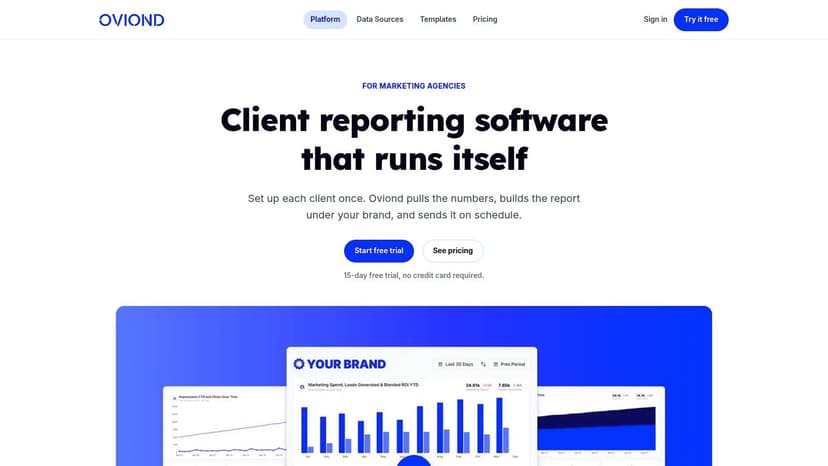
A practical agency workflow makes the fit obvious. A team managing 20 clients across PPC, SEO, and social can use branded live dashboards on custom domains, automate monthly reports, and give each client self-service access without per-seat fees or feature gates. That is the kind of setup that turns a reporting stack into an actual portal.
After the setup details, the value shows up in day-to-day delivery. Account managers don't have to recreate reporting templates for every client. They reuse assets, keep everything branded, and keep the client in one controlled space.
Where Agency Portals Are Heading Next
The next version of the client portal is less about storing reports and more about helping clients understand them without waiting for a meeting. AI-generated summaries are already pointing in that direction, because they can turn dashboard movement into plain language that clients can skim before the monthly call. That's useful for agencies that want to keep the relationship moving without overloading account managers.
MCP servers push the workflow further by letting conversational assistants help build dashboards and reports from prompts. That matters because it lowers the friction of setup, especially for teams that need to spin up new client views quickly. The portal starts to behave less like a static destination and more like a working layer between the agency and the client.
The broader trend is consolidation. Reporting, approvals, task tracking, and billing keep moving toward the same client-facing surface, because clients want one place to look and agencies want fewer handoffs. The agencies that build toward that model will feel more organized, more responsive, and a lot harder to replace.
If you're trying to replace spreadsheet chaos with a cleaner client reporting workflow, Oviond gives agencies live dashboards, white-label delivery, custom domains, and automated reporting in one place. Visit Oviond to see how it fits a multi-client agency setup and to move your reporting into a branded portal your clients can use.
Related articles
Simplify marketing reporting today
Stop juggling multiple tools. Start presenting clear, automated reports your clients will love