
Oviond Blog
White Label Reporting Tool: The Agency's Complete Guide
A practical guide to choosing a white label reporting tool for marketing agencies, with features, comparisons, and rollout tips that scale across clients.

The final business day of the month arrives, and your agency's reporting process starts to buckle. An account manager is pulling screenshots from Google Analytics, a strategist is rebuilding a slide deck, the SEO lead is exporting Search Console data, and the paid media specialist is checking ad spend against invoices. Meanwhile, three versions of the same report are sitting in Slack, and the client is waiting for a polished update that should have been routine.
That's not a dashboard problem. It's an agency operations and client-experience problem. A white label reporting tool replaces scattered exports, spreadsheet stitching, and vendor-branded delivery with a repeatable reporting layer your team can manage across multiple clients. The right setup gives clients a clear view of performance while keeping your agency's brand, process, and interpretation at the center.
Table of Contents
- The Monthly Report Scramble Most Agencies Know Too Well
- What a White Label Reporting Tool Actually Does
- Core Capabilities That Matter for Agency Reporting
- Choosing the Right Fit for Your Agency
- Rolling Out Reporting Across Your Client Base
- Sample Setups for Common Agency Retainers
- Where Generic Tools Break Down at Scale
- Putting It Together and Picking Your Next Step
The Monthly Report Scramble Most Agencies Know Too Well
At 8:00 p.m., the report still isn't ready. The logo on the PDF belongs to an old brand identity, the paid media totals don't match the finance sheet, and the account manager is trying to remember which version contains the strategist's latest commentary.
The work repeats because the agency rebuilds the reporting experience instead of maintaining one. Data comes from search, paid media, social, website analytics, email, and CRM platforms, each with its own interface and naming conventions. A monthly report then becomes a manual assembly job, followed by rounds of checking, formatting, exporting, and emailing.
Operational reality: The expensive part isn't the reporting subscription. It's the rework, version drift, and senior team attention required to produce the same client update again and again.
A white label reporting tool attacks that cycle at the source. Your team creates a branded template once, connects the relevant platforms, adds client-specific goals and commentary, and schedules delivery by email, link, PDF, or dashboard access. Industry coverage describes this move from static exports toward scheduled reports, live dashboards, and branded client portals as a defining shift in the category. Swydo's overview of white-label reporting tools outlines how agencies use custom domains, sender addresses, and branded delivery to make reporting part of the agency service.
The client no longer has to wait for someone to rebuild a deck before every call. They can open a branded dashboard when they need context, while stakeholders who prefer periodic updates receive an automated report. The agency still supplies the judgment, explanation, and next actions, but the mechanical production work stops dictating the calendar.
For a useful example of how specialized analysis can turn complex information into a clearer client-facing story, explore wine industry analysis. The same principle applies to marketing reporting, the data matters, but the presentation has to help a client understand what to do next.

If your current process still depends on spreadsheets, screenshots, and manual exports, compare it with this breakdown of manual reporting versus automated digital marketing reporting. The question isn't whether your team can produce the report. It's whether that process can stay accurate and consistent as the client roster grows.
What a White Label Reporting Tool Actually Does
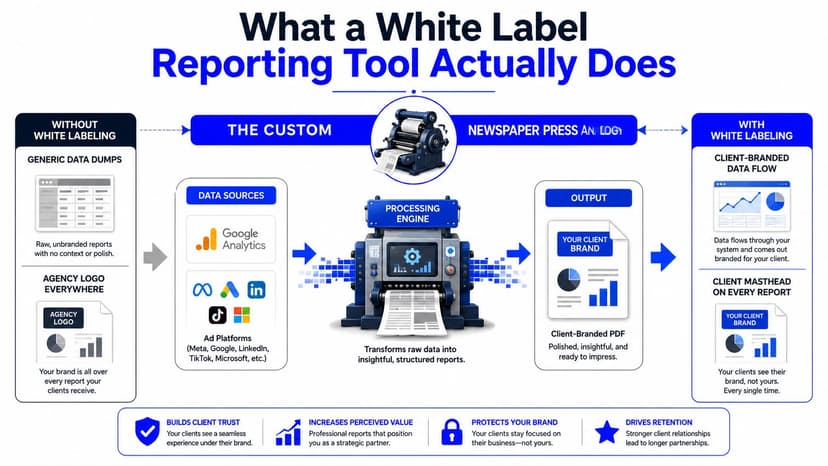
A white label reporting tool collects marketing data, organizes it into reusable reports or dashboards, and presents the result under your agency's identity. The client sees your logo, colors, tone, custom domain, and sender details instead of a software vendor's interface.
The distinction matters. White labeling isn't just uploading a logo to a generic dashboard. A credible client experience should cover the full journey:
- Client-facing URLs: Reports and dashboards should live behind a branded domain where available.
- Email delivery: Scheduled messages should use your agency's sender identity rather than a platform footer or vendor address.
- Report exports: PDFs and presentation files should look like first-party agency work.
- Access screens: Login pages, navigation, and client portals shouldn't expose the underlying provider.
- Reusable templates: Your team should be able to standardize the structure while adapting goals and commentary for each account.
The software typically connects ad platforms, analytics tools, SEO sources, social networks, CRM systems, and e-commerce data. It then places those inputs into dashboards, recurring reports, alerts, or embeddable client views. Current product documentation describes delivery by PDF or PowerPoint, shared links, scheduled distribution, live dashboards, and branded alerts as common capabilities in the category. This explanation of white-label reporting also highlights the operational benefit, automation reduces manual extraction and reformatting when several sources feed one client report.
What it isn't
A Looker Studio dashboard with an agency logo isn't automatically a white-label system. Neither is a vendor-branded login with your colors applied to a report cover. If the client sees a provider name in the URL, menu, email, footer, or password-reset flow, the brand experience is incomplete.
That doesn't make generic tools useless. Looker Studio can work for internal reporting or a small set of Google-only accounts. But agencies managing recurring multi-channel reporting need to test the entire client journey, not just the chart builder. For a broader explanation of dashboard structure and use, see this guide to digital marketing dashboards.
The practical standard is simple: the client should experience the report as part of your service, while your team benefits from the platform underneath.
Core Capabilities That Matter for Agency Reporting
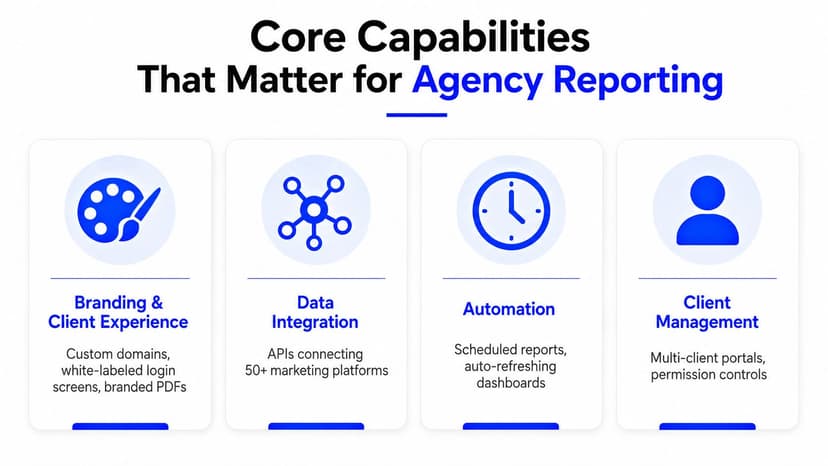
A serious platform earns its place by handling four jobs together. Branding, data operations, automation, and client management each solve a different failure point in the agency workflow.
Branding and client experience
Start with the client's view. Look for custom domains, branded login screens, white-labeled email delivery, branded PDFs, and removal of vendor references throughout the portal. A client shouldn't have to wonder whether the report came from your agency or a tool they could purchase directly.
Brand control also includes consistency. Reusable layouts, typography, color rules, footer text, and narrative blocks help every account manager deliver work that feels like it came from the same agency. Test the complete experience during a trial, including links, exports, emails, and access screens.
Data and integrations
Data coverage is where many buying decisions go wrong. A platform may display attractive charts while leaving your team to normalize names, reconcile time zones, handle currencies, and repair broken connections after an API change.
Choose connectors based on your actual roster. Agencies commonly need Google Ads, Meta, LinkedIn, GA4, Search Console, TikTok, Shopify, HubSpot, Mailchimp, and other channel-specific sources. Current market roundups describe white-label platforms supporting 30+ platforms and, in some cases, broader integration sets. DashThis's white-label reporting overview explains the category's emphasis on consolidating PPC, SEO, social, analytics, and CRM data into one client-ready view.
Automation and scheduling
Automation should cover more than a scheduled PDF. Look for recurring delivery, reusable templates, live dashboards, goal tracking, alerts, and snapshots that keep stakeholders informed without requiring them to log in.
A report that refreshes automatically still needs human interpretation. Your strategist should add context, explain changes, and identify next actions. The platform should handle the repeated data work so the team can focus on those decisions.
Collaboration and permissions
Client access must be separate from internal work. Account managers may need editing rights, strategists may need commentary access, and client stakeholders may need read-only views. Permission controls, comments, annotations, and audit trails help everyone understand who changed what and which figures were approved.
That governance matters more as the roster expands. Industry commentary identifies automated collection, normalization, API changes, and version control as core operational challenges, while other coverage emphasizes tenant isolation, permissions, security, and compliance. Improvado's discussion of white-label marketing reports is useful because it shifts attention away from cosmetic branding and toward keeping data accurate and current.
Use these four areas as a scorecard. If one is weak, the entire reporting workflow eventually feels unreliable. For a platform built around agency reporting workflows, review marketing reporting software from Oviond alongside the alternatives that match your connector map.
Choosing the Right Fit for Your Agency
Don't choose a platform from a feature list alone. Map your agency across client count, channel mix, and brand requirements, then test the workflow against a real account.
A small agency with a narrow channel mix may need a lightweight platform that produces branded reports without a long implementation. An agency managing mixed paid media, SEO, analytics, CRM, and e-commerce data needs stronger connectors, reusable templates, and scheduled delivery. A larger operation should prioritize governance, API access, custom sources, permissions, and domain control.
| Agency Tier | Client Count | Core Requirements | Watch For |
|---|---|---|---|
| Emerging agency | Under 15 | Branded reports, core integrations, simple scheduling, reusable templates | Vendor branding, limited exports, weak client access |
| Growing agency | 15 to 50 | Multi-channel connectors, dashboards, scheduled PDFs, team permissions, shared templates | Per-client charges, source limits, restricted historical data |
| Larger agency | Over 50 | API access, custom data sources, role-based access, governance, custom domain hosting | Complex implementation, data ownership, support boundaries |
Pricing structure deserves close attention. Some vendors price by client, some by dashboard, some by connected source, and some reserve full white labeling for higher plans. Compare the fully loaded cost per client, including the reports, dashboards, users, connectors, and branded delivery your team needs.
Ask vendors direct questions before signing:
- Connector depth: Does the integration expose the metrics and dimensions your strategists use, or just a narrow set of headline figures?
- API resilience: What happens when a platform changes its API or authentication process?
- Brand coverage: Are custom domains, sender addresses, login screens, and exports included?
- Usage limits: Are reports, dashboards, users, historical data, or templates capped?
- Support: Can someone help with migration and data discrepancies, or are you on your own?
Don't accept a polished demo as proof of fit. Connect one real account, reproduce an existing report, compare source figures, and ask a client-facing colleague to review the experience without explanation.
Rolling Out Reporting Across Your Client Base
A platform won't fix a messy process by itself. Rollout needs a controlled operating plan that protects client trust while your team changes the way it works.
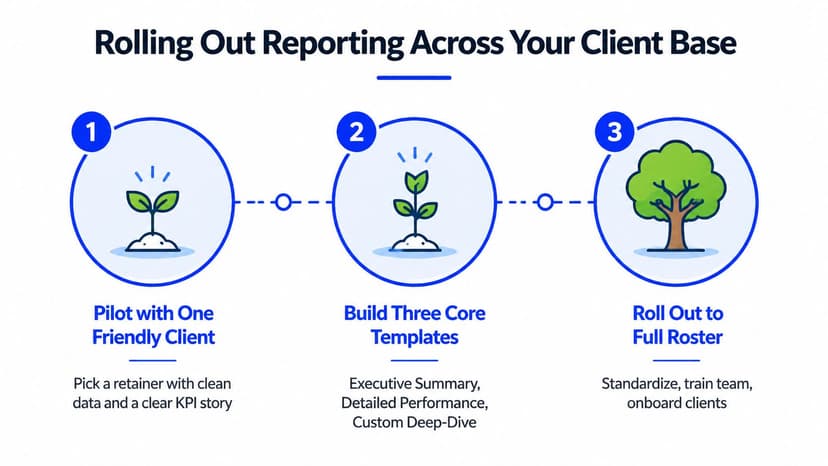
Start with one pilot
Choose a friendly retainer with clean data, a clear KPI story, and a client who will give practical feedback. Don't start with the most complex account in your roster. Build the first version around the questions the client asks, not every metric the connectors make available.
Create three reusable templates:
- Executive summary: A short view of goals, major movements, commentary, and next actions.
- Performance detail: Channel-level metrics for the people who need to inspect the work.
- Issue and opportunity view: Anomalies, threshold changes, missed targets, and decisions requiring attention.
Lock your brand rules before duplicating anything. Set the logo, palette, typography, footer language, report naming, and tone of commentary. Otherwise, each account manager will make small changes that create a fragmented client experience.
Configure access and delivery
Give clients access only to their own data. Keep internal QA, editing, and approval rights with the agency team. Then align automated delivery with billing and account-management cycles, using email digests for stakeholders who won't regularly open a dashboard.
Document the process in a runbook. Include connection ownership, template rules, QA checks, commentary standards, escalation steps, and the procedure for handling missing data. A new analyst should be able to follow it without relying on the person who built the first report.
Migrate in cohorts
Move similar accounts together, such as SEO retainers first, then paid media, then e-commerce. Keep the legacy report available as a safety net for thirty days, as recommended in the rollout plan, and compare the new report against the old one before the client receives it.
Use the pilot to find missing dimensions, confusing labels, incorrect goals, and permissions issues. Once the process works, train the team with the runbook and migrate the next cohort. The agency should own the change, not ask every account manager to invent a new reporting method.
For the client-facing layer, evaluate whether a client portal for your marketing agency can give stakeholders a consistent access point instead of another shared folder.
Sample Setups for Common Agency Retainers
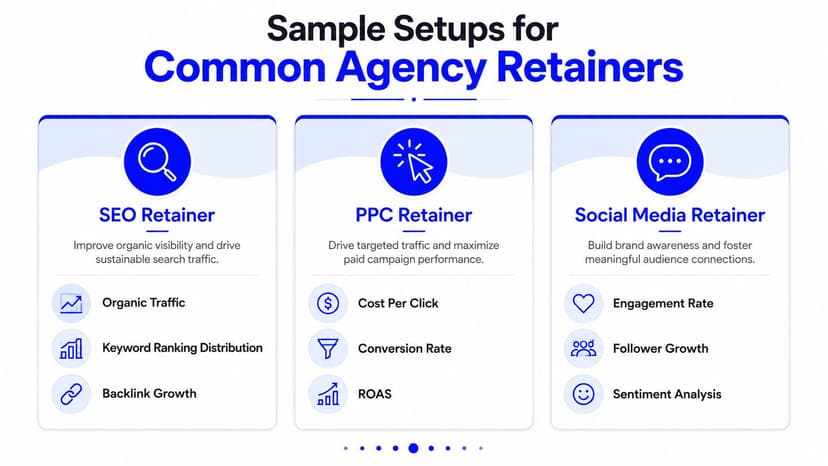
The right report reflects the retainer. A search-focused client shouldn't receive the same middle pages as a paid social account, even if both use the same executive cover page.
SEO retainer
Use the opening page to answer whether visibility and qualified site activity are moving in the intended direction. Follow it with organic traffic, keyword ranking distribution, backlink activity, and a concise technical health summary.
The narrative should stay practical. Explain which pages gained visibility, where rankings remain limited, which technical issues matter, and what the team will prioritize next. A monthly scheduled report works well when the client needs a clear progress record rather than a constant stream of isolated metrics.
Paid social retainer
Paid social reporting should connect spend to outcomes without burying the client in platform-specific terminology. Show spend by platform, ROAS, CPA movement, creative performance, and a view of frequency or saturation that helps the strategist discuss audience fatigue.
Keep the comparison consistent across channels. If Meta and LinkedIn define conversions differently, label the difference instead of presenting the figures as directly interchangeable. Alerts for sharp metric changes can prompt a conversation while the campaign is still active, rather than waiting for the month-end meeting.
E-commerce retainer
An e-commerce dashboard needs a commercial view. Combine ad spend, MER, blended ROAS, and product-level performance with inventory context where the data is available.
The executive page should remain familiar across the roster, but the deeper pages should follow the client's merchandising and acquisition questions. A product that appears weak in ad reporting may be constrained by stock, margin, or seasonality. The report should help the account team explain that relationship, not just rank products by revenue.
For all three retainers, keep one shared presentation standard. The agency brand stays consistent, while the KPI story changes according to the service being delivered.
Where Generic Tools Break Down at Scale
A spreadsheet can be useful during discovery. A native platform dashboard can be useful for campaign management. Neither automatically becomes an agency reporting system once client reporting spans multiple accounts and channels.
The failure usually appears in four places:
- Connector fatigue: A source changes its API, field names, permissions, or authentication flow, and someone must repair every affected report.
- Version chaos: Dashboards live in separate folders, templates diverge, and account managers unknowingly send outdated layouts.
- Brand leakage: A vendor name appears in a login screen, URL, email, footer, or navigation element.
- Manual refresh labor: A senior analyst repeatedly downloads exports, pastes figures, checks formulas, and rebuilds PDFs.
The hidden cost is not the spreadsheet license or the free dashboard. It's the human time required to keep the stack accurate and presentable. Industry commentary specifically identifies multi-platform data collection, schema normalization, API changes, and version control as the operational bottlenecks that buyers often underestimate. Bold Reports' evaluation criteria for white-label tools also puts tenant isolation, security, deployment flexibility, and compliance on the buying checklist.
| Dimension | Spreadsheets and Native Dashboards | White-Label Reporting Platform |
|---|---|---|
| Data collection | Manual exports or separate platform views | Connected sources consolidated into reusable views |
| Templates | Often copied account by account | Shared templates with client-level customization |
| Branding | Inconsistent and frequently vendor-visible | Agency identity across reports, dashboards, and delivery |
| Permissions | Shared links and folder rules can become messy | Client isolation and role-based access |
| Delivery | Manual emails, attachments, and reminders | Scheduled reports, links, portals, and automated refresh |
| QA | Repeated manual reconciliation | Standardized checks within a repeatable workflow |
Looker Studio remains a reasonable choice for internal analysis and limited Google-only reporting. The problem starts when an agency treats it as a complete white-label operating layer while adding third-party connectors, custom workarounds, and manual maintenance around it.
Change the cost conversation. Don't ask only whether a tool is affordable. Calculate the fully loaded cost of each client report, including production, QA, revisions, delivery, and the time senior staff lose to repetitive work.
Putting It Together and Picking Your Next Step
A reporting platform should give your agency more than attractive charts. It should protect the client experience, increase account-manager capacity, and let you add retainers without rebuilding the same process from scratch.
Score your current stack against four questions:
- Brand control: Does every client touchpoint look and sound like your agency?
- Data depth: Can you connect the sources your roster uses and keep their definitions consistent?
- Automation depth: Can templates, dashboards, alerts, and delivery run without monthly reconstruction?
- Collaboration permissions: Can clients see only their data while your team retains clear ownership and approval control?
Then take a practical path. Audit one current report and record every manual task involved. List the integrations that the accounting department needs. Shortlist two platforms, including a white-label-native option such as Oviond, and rebuild the same report with the same source data. Run a paid pilot with one client for thirty days, review accuracy and client feedback, and choose a rollout cohort.
Don't buy a white label reporting tool because the demo looks polished. Buy it when it removes a recurring operational failure your team can name, measure, and standardize.
The right decision turns reporting into a dependable client-service layer. It replaces spreadsheets, exports, and version chasing with a branded system your agency can improve every billing cycle.
Oviond brings live dashboards, scheduled branded reports, white-label delivery, custom domains, 60+ integrations, unlimited users, and AI/MCP-assisted setup into one agency-focused platform. Visit Oviond to map your current reporting workflow, test a client setup, and decide whether it fits your next rollout.
Related articles
Simplify marketing reporting today
Stop juggling multiple tools. Start presenting clear, automated reports your clients will love