
Oviond Blog
White Label Client Portal for Agencies: The Complete Guide
Learn how a white label client portal helps agencies deliver branded dashboards and automated reports. Discover features, setup steps, and best practices.

You're halfway through month-end reporting. Google Analytics is open in one tab, Meta Ads Manager in another, and a spreadsheet with three different versions is sitting in Slack. An account manager is checking formulas, copying charts into a PDF, and trying to remember whether the client wanted leads grouped by campaign or landing page. The report goes out, then the follow-up begins: “Can you send that again?” “Why doesn't this number match last month?” “Where can I see the latest figures?”
That workflow makes agencies look busy, but it doesn't make client reporting feel valuable. A white label client portal changes the delivery model. Instead of treating reporting as a monthly document-production task, you give each client a branded place to view dashboards, scheduled reports, and approved data without seeing the reporting vendor behind the experience.
Table of Contents
- Why Agencies Are Rethinking Client Reporting
- What a White Label Client Portal Actually Is
- How Branded Portals Change Agency Operations
- Key Features and Security Considerations
- Implementation Checklist for Your First Portal
- Common Mistakes to Avoid When Scaling
- Comparing Oviond to Other Reporting Platforms
- Making the Right Choice for Your Agency
Why Agencies Are Rethinking Client Reporting
The monthly reporting scramble usually starts with good intentions. An account manager wants to give the client a clear view of performance, so they pull data from Google Analytics, Meta Ads Manager, Google Search Console, email platforms, CRM systems, and internal spreadsheets. Then they reconcile naming differences, format the charts, write commentary, export a PDF, and send it from an agency inbox.
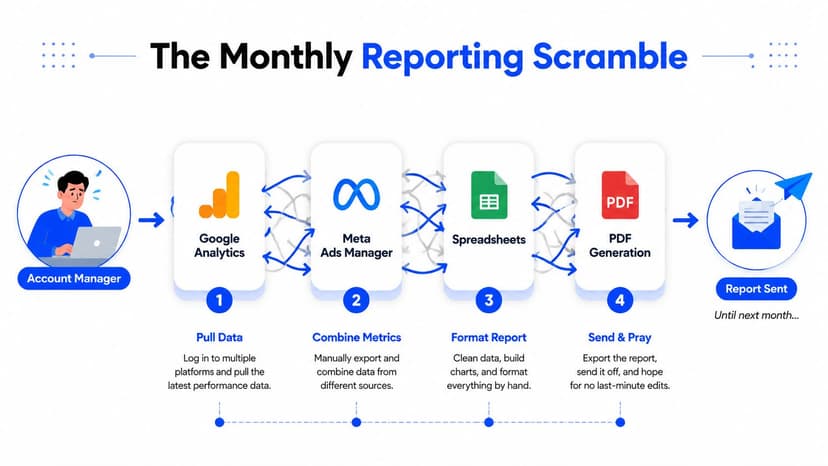
The work doesn't end when the file is sent. A late data connector, an updated spreadsheet, or a client-requested metric can force another round of edits. Version control becomes a quiet operational risk, especially when account managers, analysts, and client-success leads each keep their own copy.
Practical rule: If the team has to rebuild the same report every cycle, the agency has a production problem, not a reporting problem.
Clients also expect a different experience now. They want access to current performance information, branded communication, and a straightforward way to understand what the agency is doing. A static report can still have a place in a review meeting, but it shouldn't be the only client-facing layer.
That's why agencies are moving from disconnected exports toward live dashboards and automated client reporting. A portal gives clients one destination for performance views, while the agency keeps control of the presentation, access, and delivery process. Oviond's data and measurement resources reflect this broader shift toward bringing fragmented marketing data into a more manageable reporting workflow.
The operational difference is simple. Instead of asking an account manager to assemble a report from scratch, the agency defines a repeatable dashboard structure, connects approved sources, and schedules delivery. The team still interprets results and leads the conversation, but it no longer spends its energy acting as a human export tool.
What a White Label Client Portal Actually Is
A white label client portal is a client-facing web environment that carries the agency's identity instead of the software vendor's. Clients log in through an agency-controlled experience to view dashboards, reports, shared materials, and other approved information.
A basic client dashboard may show charts inside a reporting application. A reporting tool may generate a PDF or email. A portal brings those elements together under a consistent client-facing shell. The distinction matters because clients judge the delivery experience as part of the service, not as a separate technical detail.
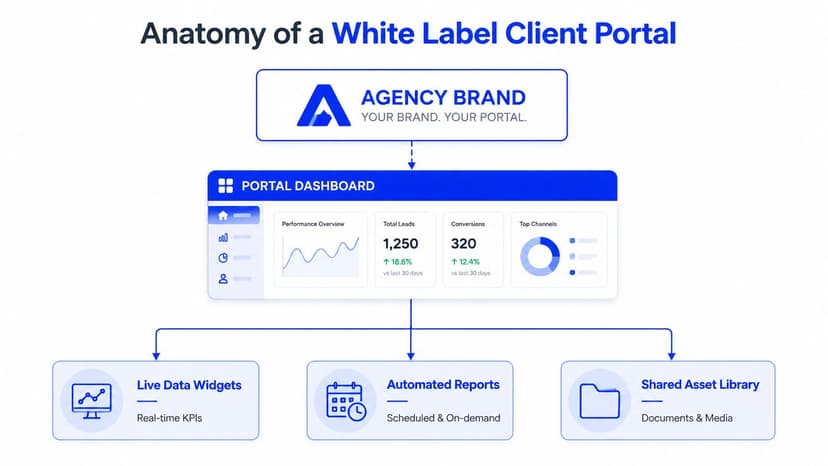
The domain layer
A credible white-label setup starts with the URL. Agencies commonly use a branded subdomain such as portal.yourcompany.com or reports.youragency.com. The vendor's subdomain shouldn't appear in the login experience, links, notifications, or system messages.
Technically, this usually involves DNS-based domain mapping, a CNAME record, HTTPS certificate provisioning, and hostname-based routing to the correct client workspace. AgencyAnalytics' custom-domain documentation describes the practical requirement for a fully qualified domain and the need to allow DNS changes to propagate before the client access area works correctly.
The identity layer
Branding goes beyond uploading a logo. The client should see the agency's logo, colors, favicon, email sender identity, login page, and report styling. Password-reset emails and system notifications deserve attention too, because a vendor-branded message can undermine an otherwise polished portal.
The governance layer
A portal also needs to separate client data properly. Client viewers, agency staff, editors, and administrators shouldn't all receive the same access. Look for role-based permissions, client-specific workspaces, secure authentication options, and a clear record of access activity.
The important distinction is this: white-label branding doesn't automatically mean secure, compliant, or properly isolated. A branded portal can still have weak permissions or unclear data residency. Branding, security, and governance should be evaluated independently.
How Branded Portals Change Agency Operations
The biggest benefit isn't the logo on the login page. It's the change in who owns the reporting process. With spreadsheets and disconnected dashboards, the account manager owns every step. With a portal, the agency owns the system and the account manager focuses on interpretation, action, and client communication.
Reporting becomes a recurring system
Before, an account manager might collect figures, reconcile inconsistent labels, format charts, and produce a PDF for every client. After migration, the agency can use reusable dashboard templates, approved connectors, and scheduled delivery. Clients can open the portal when they need the latest view instead of waiting for a new attachment.
Oviond describes this model through scheduled agency report delivery, where reports can be scheduled once and delivered on each cycle without manual rebuilding. That doesn't remove the need for quality control. It moves quality control to the template, connector, and review stages where it can be managed consistently.
Onboarding starts with a template
A new client shouldn't require a blank canvas. Create a standard structure for executive KPIs, channel performance, campaign details, commentary, and next actions. Then adjust the view for the client's goals.
This approach gives account managers a dependable starting point without forcing every client into an identical report. The template controls the repeatable parts. The account team adds the judgment.
Client conversations get a clearer trigger
A portal won't replace strategy. It can, however, make the reason for a strategy conversation easier to see. An account manager can point to a change in channel performance, an unmet goal, or a trend that needs investigation, then connect that observation to the next action.
The value comes from context. A dashboard that displays every available metric creates more noise. A dashboard that shows the few measures tied to the client's objectives gives the account manager a better starting point.
Internal maintenance becomes more deliberate
Looker Studio can work well for straightforward dashboarding, and tools such as AgencyAnalytics, Whatagraph, and Swydo may suit agencies with particular reporting preferences. The trade-off appears when each client has a separate template, connector setup, naming convention, and permission model.
A portal rollout works better when the agency standardizes the system before adding exceptions.
| Workflow | Before, Manual | After, Portal | Typical Gain |
|---|---|---|---|
| Monthly reporting | Gather exports, reconcile figures, format a PDF | Maintain a reusable dashboard and schedule delivery | Less repeated production work |
| Client onboarding | Build a reporting view from a blank template | Duplicate an approved workspace structure | More consistent setup |
| Strategy calls | Search across platforms for supporting evidence | Review selected KPIs in one client view | Faster preparation for discussions |
| Client access | Send attachments and update links manually | Give clients a branded destination | Fewer version questions |
| Internal operations | Maintain scattered templates and spreadsheets | Govern connectors, templates, and permissions centrally | Easier multi-client oversight |
Key Features and Security Considerations
A logo swap is not a white-label operating model. Surface-level theming can make a dashboard look more polished while leaving the vendor's URL, email sender, password-reset flow, and error pages visible. That creates an inconsistent experience and puts the agency in the awkward position of presenting a third-party interface as its own.
Compare the branding depth
| Feature Category | Shallow Theming | True White-Label Portal |
|---|---|---|
| Domain | Vendor URL remains visible | Agency-controlled custom domain |
| Login screen | Logo or colors may change | Agency identity carries the complete entry experience |
| Notifications | Vendor sender or templates remain | Branded sender identity and client messaging |
| SSL and routing | May be handled only at the platform level | Custom-domain HTTPS and workspace routing are supported |
| Permissions | Basic viewer access | Client, team, editor, and administrator roles |
| Reports | Export-focused delivery | Live dashboards plus scheduled branded reports |
| System messages | Vendor references may remain | Client-facing flows reflect the agency brand |
A technically sound setup typically requires DNS-based domain mapping, automated HTTPS certificate provisioning and renewal, and hostname-based tenant routing. The white-label implementation guidance for agencies explains why those infrastructure details matter. Without them, a portal may be visually branded but not fully agency-owned from the client's point of view.
Check access before appearance
Client-level isolation is more important than a perfect color palette. Confirm that each user can see only the workspaces, dashboards, files, and reports intended for them. Viewer and editor roles should be clear, and administrators should be able to manage access without creating shared logins.
Security questions also deserve direct answers. Ask how the platform handles encryption in transit and at rest, multifactor authentication, SSO or SAML, audit logs, data residency, account recovery, and user deprovisioning. A 2026 guide to choosing a white-label client portal makes the important distinction that branding is separate from security and residency.
Treat connectors as part of governance
A portal that connects every possible source can become difficult to manage. Start with the platforms the account team uses, validate the data, and define who owns connector failures. Build a process for expired credentials, changed account permissions, and metrics that no longer match the client's agreed definitions.
For agencies evaluating the reporting layer specifically, this guide to white-label marketing dashboards is useful for thinking about branded dashboards, recurring delivery, and the difference between client presentation and underlying reporting infrastructure.
Implementation Checklist for Your First Portal
A portal rollout is easier when the team treats it as an operations project rather than a design exercise. The first client should test the process, not become the process.
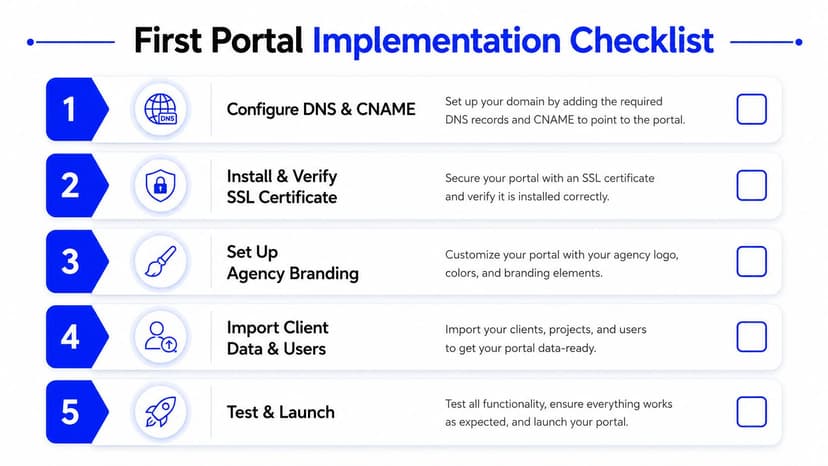
1. Configure the domain
Choose a naming convention before anyone creates client workspaces. Decide whether the agency will use one shared portal domain or separate branded domains for different client groups. Add the required CNAME record, confirm the platform recognizes the domain, and test staging and production paths separately.
2. Verify secure access
Check that HTTPS works on the custom domain and that certificate provisioning and renewal are handled reliably. Test the login page, invitation links, password recovery, redirects, and browser warnings before sending an invitation to a client.
3. Apply the agency brand
Upload the logo, map the color palette to the correct hex values, configure the favicon, and review typography and spacing. Then send test invitations from the branded email identity. A client should not encounter the vendor's name halfway through onboarding.
4. Connect and validate data
Connect the agreed analytics, paid media, search, email, CRM, and other marketing sources. Compare the portal against the agency's existing report for the same period, checking date ranges, filters, attribution definitions, currency settings, and naming conventions.
Don't skip this reconciliation step. A beautifully branded dashboard with unexplained discrepancies will lose trust quickly.
5. Provision users and test the journey
Create client accounts, assign permissions, and schedule the appropriate reports. Run a QA pass across common browsers and mobile layouts, check links, open every important dashboard, and test the experience with a user who wasn't involved in the build.
Finish with a short client walkthrough. Show where to find the current dashboard, where scheduled reports arrive, how to request help, and who can change access. The first login should feel obvious, not like a software implementation project.
Common Mistakes to Avoid When Scaling
Launching one portal successfully can create false confidence. The first client often receives extra attention, manual fixes, and direct support from the person who built the workspace. That approach breaks when the agency manages a larger client base.
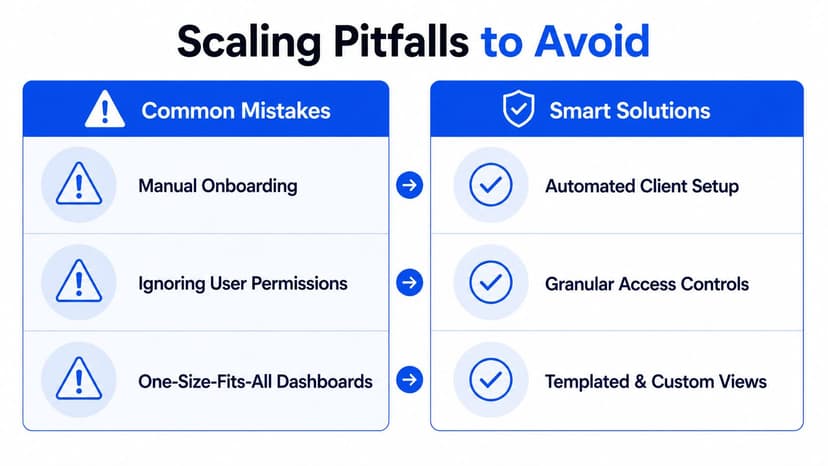
Mistake one is treating every dashboard as custom
If each account manager builds a portal differently, the agency loses control of definitions, navigation, and maintenance. Clients may have legitimate differences, but those differences should sit on top of a governed base template.
Create standard dashboard components, naming rules, KPI definitions, and approval ownership. Keep a controlled exception list for clients with uniquely different reporting requirements.
Mistake two is making DNS a one-off chore
Manual domain setup becomes a recurring source of errors. A missed certificate renewal, incorrect subdomain, or untested redirect can make a client-facing portal look broken even when the underlying data is fine.
Document ownership, verification, renewal, and escalation. Use a repeatable setup checklist and keep a record of every active branded domain. Domain management belongs in the agency's operational process, not in one employee's memory.
Mistake three is adding connectors without a support plan
More integrations can create more maintenance. When an agency connects a source because it's available, it may add metrics that nobody reviews and failure points nobody monitors.
Start with the client's agreed questions. Add a source when it supports a decision, not because the platform can connect to it. The common reporting mistakes guide is a useful reference for auditing the quality of recurring client reports before expanding the setup.
Mistake four is assuming clients will teach themselves
Some clients adopt a portal immediately. Others need a short walkthrough and a clear reason to return. Give them a simple launch message, explain what the dashboard replaces, and show how to find the information they previously requested by email.
Scale test: If a new account manager can't provision a client from your documented process, the system isn't ready for broader rollout.
Comparing Oviond to Other Reporting Platforms
Platform comparisons become more useful when they start with agency operating conditions. A team managing recurring reporting across a growing client base needs to evaluate branding depth, connector maintenance, client permissions, template governance, and pricing structure together.
Looker Studio can be a practical choice for agencies that need flexible dashboard creation and already have the skills to maintain data sources. AgencyAnalytics, Whatagraph, and Swydo can fit teams looking for established agency reporting workflows with their own approaches to dashboards, integrations, and white-label delivery. DashThis is also relevant for agencies prioritizing branded reporting and dashboard presentation.
The trade-off is rarely about whether a platform can display a chart. It's about how much work remains outside the platform, including data blending, report scheduling, client access, domain setup, and template maintenance.
| Feature | Oviond | AgencyAnalytics | DashThis | Looker Studio |
|---|---|---|---|---|
| Agency reporting focus | Built around multi-channel agency reporting | Agency reporting and client dashboards | Branded dashboards and reports | Flexible dashboarding across connected sources |
| White-label delivery | White-label reports and dashboards with custom-domain support | White-label options and custom URLs | White-label reporting options | Branding depends on configuration and connected services |
| Data connections | 60+ integrations are described by the publisher | Broad marketing integration coverage | Broad marketing integration coverage | Uses connectors and data sources selected by the team |
| Recurring delivery | Scheduled branded reports and automated delivery | Scheduled reporting workflows | Scheduled report delivery | Requires configuration across the reporting setup |
| Team access | Unlimited users are included in the publisher's product information | Plan and permission details should be checked | Plan and permission details should be checked | Managed through the Google workspace and report settings |
| Pricing approach | Pricing by client count, with features in one plan | Confirm current plan limits and client structure | Confirm current plan limits and client structure | Product and connector costs depend on the setup |
| Migration considerations | Check available imports, reusable assets, and API options | Review API and export options | Review export and connector options | Existing reports may need rebuilding when structures change |
One practical distinction is whether the agency pays for more seats, more clients, or a broader feature tier as it grows. Pricing by client count can make margins easier to model than a structure that introduces new charges for team members or reporting features, but every agency should test the exact plan against its own client mix.
Oviond is positioned as a marketing reporting platform for agencies, with live dashboards, scheduled branded reports, custom domains, custom email senders, 50+ connections, reusable templates, unlimited reports and dashboards, unlimited users, and AI or MCP-assisted setup described by the publisher. That makes it a candidate for agencies that want the reporting infrastructure and white-label delivery in one agency-oriented workflow. Smaller teams with limited reporting complexity may reasonably prefer a lighter tool if its constraints don't create extra manual work.
Making the Right Choice for Your Agency
The right portal depends on how much recurring delivery the agency manages and how much operational control it needs.
A solo operator with a small client roster may prioritize simple setup, clean dashboards, and low administrative overhead. A boutique agency managing 5–20 clients needs stronger templates, client-level permissions, scheduled delivery, and a reliable custom domain. An agency managing 50+ accounts needs governance, connector ownership, standardized onboarding, domain management, and a pricing model that remains predictable as the client base changes.
Start with the non-negotiables
A serious agency evaluation should confirm custom-domain hosting, automated report scheduling, and client-facing access controls. Then test the details that comparison pages often skip:
- Brand coverage: Check URLs, login screens, email senders, password recovery, and system messages.
- Data isolation: Confirm that each client sees the intended workspace and nothing else.
- Operational ownership: Identify who handles connector failures, template changes, and access requests.
- Client adoption: Test the portal with a real client, not just an internal administrator.
- Growth economics: Model how the plan behaves as the agency adds clients, users, dashboards, and reporting requirements.
Before committing to a full migration, audit the current reporting stack. Identify the three activities that consume the most attention each cycle, then run a focused pilot with one client cohort. Use the pilot to test data accuracy, onboarding, permissions, branded delivery, support questions, and internal ownership.
A white label client portal isn't just a prettier reporting tool. It can make the agency's work easier to access, easier to govern, and more clearly connected to the client relationship. For a practical shortlist and evaluation criteria, review client portal software for agencies.
Oviond brings live marketing dashboards, scheduled branded reports, custom domains, 60+ integrations, reusable templates, and unlimited users into an agency-focused reporting workflow. Visit Oviond to see how your team can replace spreadsheet and Looker Studio chaos with agency reporting that finally feels simple.
Related articles
Simplify marketing reporting today
Stop juggling multiple tools. Start presenting clear, automated reports your clients will love