
Oviond Blog
The Oviond MCP server: client reporting from Claude, ChatGPT and Cursor
Connect Claude, ChatGPT or Cursor to Oviond once. Then pull client numbers, build reports and schedule them from the chat, across 100+ data sources.
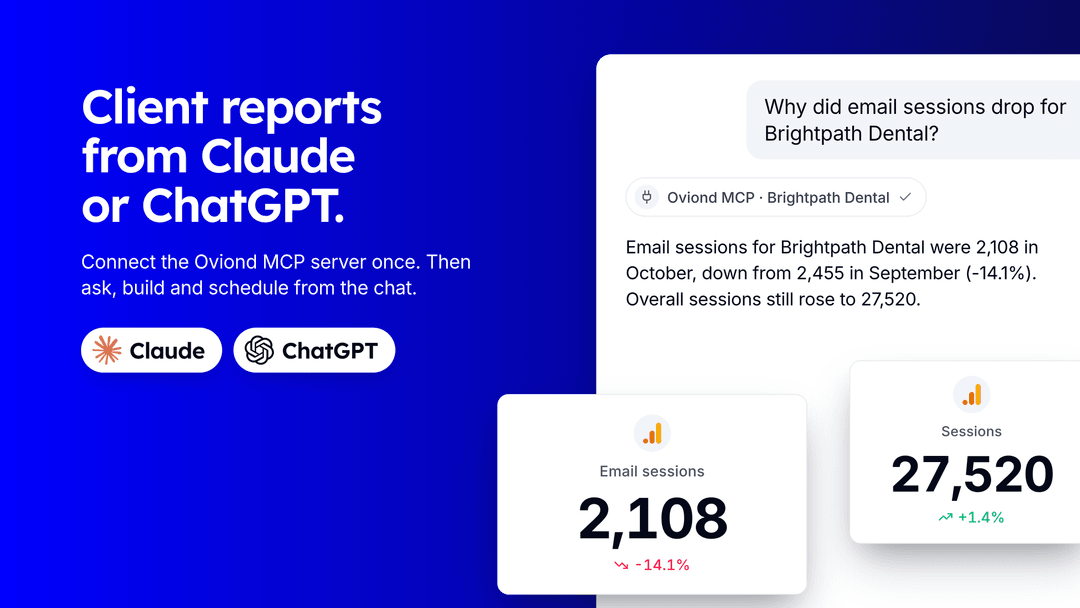
The Oviond MCP server connects Claude, ChatGPT, Cursor and other AI assistants to your Oviond account. It’s a hosted server at https://api.oviond.com/mcp with 125 tools. Your assistant can pull any client’s numbers from the 100+ data sources Oviond supports, then build the report, write the summary, apply your template to every client and schedule the email, all from the chat.
We announced the MCP server and the REST API in July and never published the full write-up. This is it, updated for November 2026: what the server does, how to connect it, what it won’t do, and how it compares with single-platform servers like the Google Ads MCP.
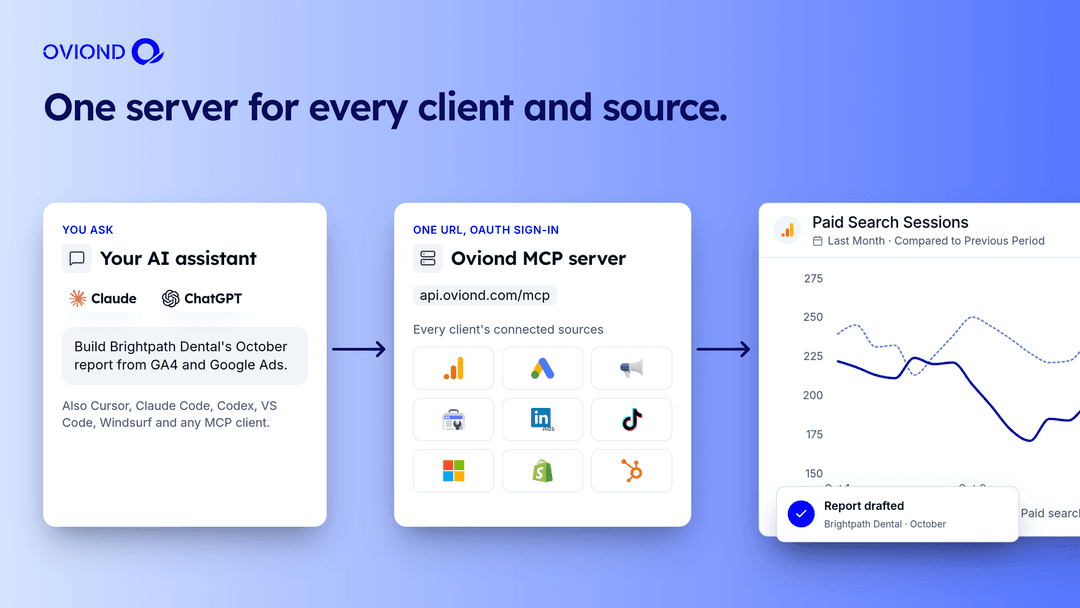
The Oviond MCP server at a glance
Checked against the Oviond docs on November 16, 2026.
| Oviond MCP server | |
|---|---|
| Server URL | https://api.oviond.com/mcp |
| Transport | Streamable HTTP, hosted by Oviond. Nothing to install or run. |
| Sign-in | OAuth 2.1 with PKCE. You sign in to Oviond in a browser window. |
| Tools | 125 |
| Data sources | 100+ marketing platforms (the docs list 104 as of November 2026) |
| Works with | Claude, Claude Code, ChatGPT, Codex, Cursor, VS Code (Copilot agent mode), Windsurf, Openclaw, any MCP client |
| Rate limit | 300 requests per minute per account, separate from the REST API |
| Plans | Included on subscription plans. Lifetime plans need the API add-on. |
What your assistant can do with it
The 125 tools cover most of what you do in the Oviond app. Tool names start with the verb, like create_client, add_widgets and create_automation, so the assistant can pick the right one from what you asked.
- Answer questions about client data.
query_datapulls live numbers from a client’s connected source for any date range and saves nothing. Ask why email sessions dropped, which campaign spent the most, or how this month compares with last. - Build reports and dashboards. Create a report, add pages, and add up to 300 widgets in one call, from KPI cards and charts to titles, text, images and goals.
- Write the summary into the report. Your assistant reads the numbers back and writes a client-facing summary into a text widget, where you can edit it before it goes out.
- Roll it out to every client. Turn a finished report into a template, apply it to other clients, and build a theme in a client’s colors.
- Schedule delivery. Create an automation that emails the report daily, weekly or monthly.
- Run the account. Add clients, organize folders, manage team members, custom domains, branding, goals and calculated metrics.
- Check its own work.
preview_reportshows the report as the client sees it, andaudit_report_healthflags reports with no connected sources or paused automations.
Watch it build a report in Claude
Oviond MCP Server Demo September 2026: AI Reporting for Marketing Agencies
In this 14-minute demo I connect Oviond to Claude, add four clients with one prompt, build a GA4 report, write the summary, brand it, schedule it and roll it out as a template. Skip to the part you want:
- 0:00 Intro
- 0:38 Find AI Connectors in Oviond
- 1:20 Connect Oviond in Claude
- 2:20 Check which account you’re connected to
- 3:40 Add four clients with one prompt
- 4:20 Create a blank dashboard
- 5:20 Pull GA4 sessions and users into a widget
- 5:50 Add a heading
- 6:40 Add three more GA4 widgets
- 7:40 Write a client-facing summary into a text widget
- 8:50 Build and apply a client-branded theme
- 10:00 Schedule a weekly automation, created paused
- 11:20 Turn the report into a template
- 12:00 Apply the template to three more clients
- 13:20 Wrap-up
Connect it in a couple of minutes
Every client uses the same URL. You paste it in, sign in to Oviond in the browser window that opens, and approve the connection. In the Oviond app you’ll find the instructions under AI Connectors.
Claude (web and desktop)
Open Settings → Connectors, click Add custom connector and enter https://api.oviond.com/mcp. Sign in when Claude opens the Oviond window, then ask Claude to “list my Oviond clients” to confirm.
Claude Code
claude mcp add --transport http oviond https://api.oviond.com/mcpRun /mcp inside Claude Code and choose to authenticate.
ChatGPT
Add Oviond as a custom connector in ChatGPT’s settings with the same URL, then complete the sign-in.
Cursor
Add this to ~/.cursor/mcp.json, restart Cursor, and sign in on the first tool call:
{
  "mcpServers": {
    "oviond": {
      "url": "https://api.oviond.com/mcp"
    }
  }
}
VS Code, Codex, Windsurf and other MCP clients
Register a remote streamable HTTP MCP server at https://api.oviond.com/mcp and complete the OAuth sign-in. Local stdio setups don’t apply, because we host the server.
Optional: install the Oviond skill
Skills give your agent our playbooks for common jobs, so it follows the same steps we would:
npx skills add oviond/skills --skill oviondThe skills page in the docs also lists fix-broken-report and write-executive-summary.
How an agent builds a widget without guessing
Language models are good at sounding sure about metric names that don’t exist. The server is built so the agent never has to guess.
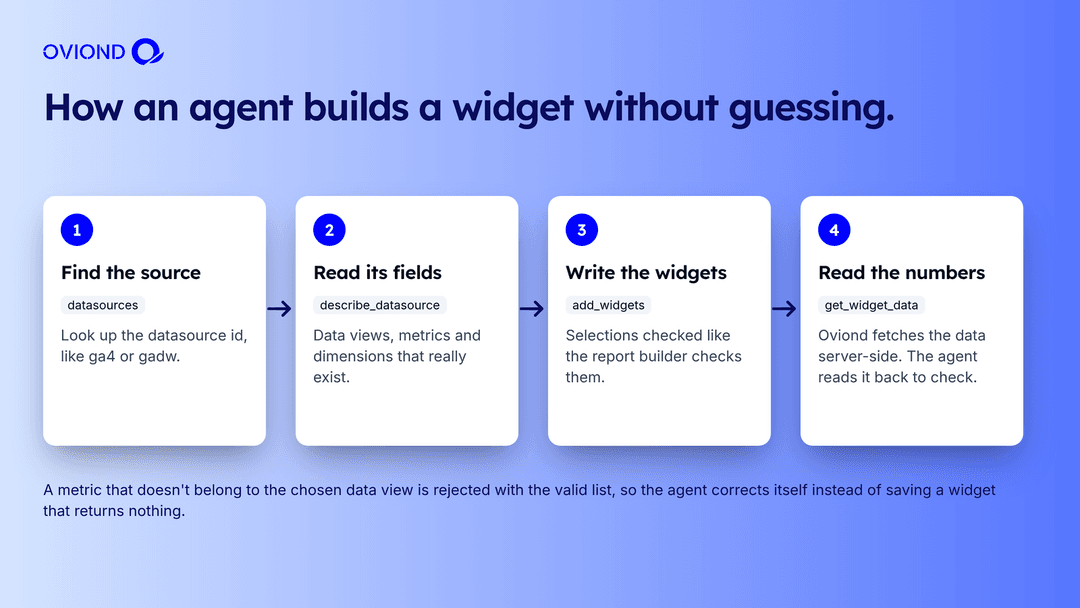
- Find the source.
datasourceslists every platform Oviond supports with the ID the other tools use, such asga4,gadwfor Google Ads orfb-adsfor Meta Ads. - Read its fields.
describe_datasourcereturns that source’s data views, metrics, dimensions and any settings a view needs. - Write the widgets.
add_widgetschecks every selection the same way the report builder does. A metric that doesn’t belong to the chosen data view comes back as an error with the valid options, so the agent fixes it instead of saving an empty widget. - Read the numbers. Oviond fetches the data on our servers and returns each widget’s state and totals.
get_widget_datareads them back so the agent can check its work.
If the client hasn’t connected that source yet, the widget shows demo data until they do.
Prompts to try
Copy these into your assistant once Oviond is connected and swap in your own names.
- Which Oviond account am I connected to?
- Add three clients: Brightpath Dental, Harbor Fitness and Cedar Legal.
- For Brightpath Dental, how did GA4 sessions in October compare with September? Break it down by channel.
- Create a dashboard called Monthly Marketing Report for Brightpath Dental with sessions, users and engagement rate from GA4 and cost, clicks and conversions from Google Ads.
- Read the numbers on this report and write a three-paragraph summary for the client into a text widget at the top.
- Build a theme in navy and teal and apply it to this report.
- Email this report to marketing@brightpath.example on the 1st of every month at 9:00 AM. Create the automation paused and send me a test first.
- Turn this report into a template and apply it to Harbor Fitness and Cedar Legal.
One server or one per platform?
Search for “Google Ads MCP”, “Meta Ads MCP” or “Google Analytics MCP” and you’ll find servers that each cover one platform. They’re useful if you work inside one ad account. An agency with dozens of clients on several platforms ends up running and authorizing one server per platform, then mapping accounts to clients by hand.
| Single-platform MCP servers (example: Google’s Google Ads MCP) | Oviond MCP server | |
|---|---|---|
| Platforms | One per server | 100+ data sources through one URL |
| Client mapping | You map ad accounts and properties to clients yourself | Every client’s connected sources are already mapped |
| Setup | Google’s Google Ads MCP needs Python 3.10 or later, pipx, the gcloud CLI and a Google Cloud project approved for the Google Ads API, plus your own Cloud Run deployment for remote use | Paste the URL and sign in |
| Output | Rows of data in the chat | Answers, plus reports, dashboards, templates, themes and scheduled emails |
| Platform API changes | Yours to track | Handled by Oviond. In August 2026 we moved Google Ads to API version 23 |
| Campaign editing | Depends on the server | Not supported. Oviond reads and reports on data |
Comparison checked November 16, 2026 against Google’s Google Ads MCP documentation and the Oviond docs.
You stay in control
- Your sign-in, your permissions. The assistant works as the Oviond user who signed in and can only touch what that user can. Every call is scoped to your account.
- Short-lived tokens. Access tokens last an hour. Refresh tokens last 30 days and rotate each time they’re used.
- Destructive tools are labeled. Every tool carries read-only and destructive hints, so a well-built client asks you before it deletes, sends or unpauses anything.
- Most removals can be undone. Archiving clients, reports, templates, media and automations sends them to the Archive, where you can restore them.
- Test before you send. We recommend creating automations paused and sending a test email before you turn them on. The demo video does exactly that.
- Switch it off any time. Settings → Security has a switch for MCP access and lets you revoke one connection or all of them. MCP activity shows in the activity log with the source “mcp”.
- Fair rate limits. MCP traffic is limited to 300 requests per minute per account. The Oviond web app is never rate-limited.
What it can’t do yet
- Connect OAuth data sources. Google, Meta, LinkedIn and TikTok need a browser sign-in, so you connect them once in the Oviond app. API-key sources can be connected from the chat.
- Upload files. Logos, media and custom data files are uploaded in the app.
- Billing, API keys, notifications and account security. These aren’t on the MCP server. Ask Oviond, the agent inside the app, can handle them.
- Edit ad campaigns. Oviond is a reporting platform. The tools read and report on campaign data and don’t change bids, budgets or ads.
MCP server, Ask Oviond or the REST API?
| Use | When |
|---|---|
| Oviond MCP server | You already work in Claude, ChatGPT or Cursor and want to ask questions and build reports there. |
| Ask Oviond | You want the AI next to the report editor, watching each change land. |
| Oviond REST API | You’re writing code: a client portal, a Slack digest, a sync to your warehouse. 186 documented endpoints, one API key. |
All three reach the same account, clients and data. If you’re weighing whether to build your own reporting stack on top of the platform APIs instead, read build vs buy for marketing reporting.
Pricing
MCP access is included on Oviond subscription plans, priced at $5 per client per month with a 10-client minimum, so $50 a month to start ($40 billed annually). Lifetime plans need the API add-on. MCP use doesn’t draw on your Ask Oviond balance. See pricing for the full table.
Connect your assistant to your clients’ data
Start a 15-day free trial with every feature included and no credit card required. Connect one client’s data sources in Oviond, add the MCP server to your assistant and ask your first question.
More on the Reporting API and MCP server feature page and in the MCP docs.
FAQ
What is the Oviond MCP server?
A hosted Model Context Protocol server at https://api.oviond.com/mcp. It gives Claude, ChatGPT, Cursor and other MCP clients 125 tools to read your clients’ marketing data and to create and change clients, reports, widgets, templates, themes and automations in your Oviond account.
Which AI assistants work with it?
The docs list Claude (web and desktop), Claude Code, ChatGPT, Codex, Cursor, VS Code with GitHub Copilot agent mode, Windsurf and Openclaw. Any client that supports remote MCP servers over streamable HTTP with OAuth can connect.
Is the Oviond MCP server a Google Ads MCP or Meta Ads MCP?
It covers both and more. One connection reaches every data source your clients have connected in Oviond, including Google Ads, Meta Ads, GA4, Search Console, LinkedIn Ads and TikTok Ads. It reads and reports on that data. It does not edit ad campaigns.
How much does it cost?
MCP access is included on Oviond subscription plans, which start at $50 a month for 10 clients. Lifetime plans need the API add-on. Using the MCP server does not draw on your Ask Oviond balance.
Can the assistant connect a client’s Google or Meta account?
No. Sources that use OAuth, such as Google, Meta, LinkedIn and TikTok, need a browser sign-in, so you connect them once in the Oviond app. Sources that use an API key can be connected from the chat.
Can it delete things without asking?
Every tool carries read-only and destructive hints, so your assistant can ask before it runs a destructive one. Most removals archive the item, and archived items can be restored. Turn MCP access off or revoke connections any time in Settings, Security.
Is it the same as Ask Oviond?
They share the same idea. Ask Oviond is the AI agent built into the Oviond app. The MCP server lets the assistant you already use work on your Oviond account from outside the app.