
Oviond Blog
Ask Oviond, MCP or API? What each one does, plus 10 prompt chains to try
Ask Oviond, the MCP server, or the API? What each one does, who it is for, and 10 prompt chains for a real client report.
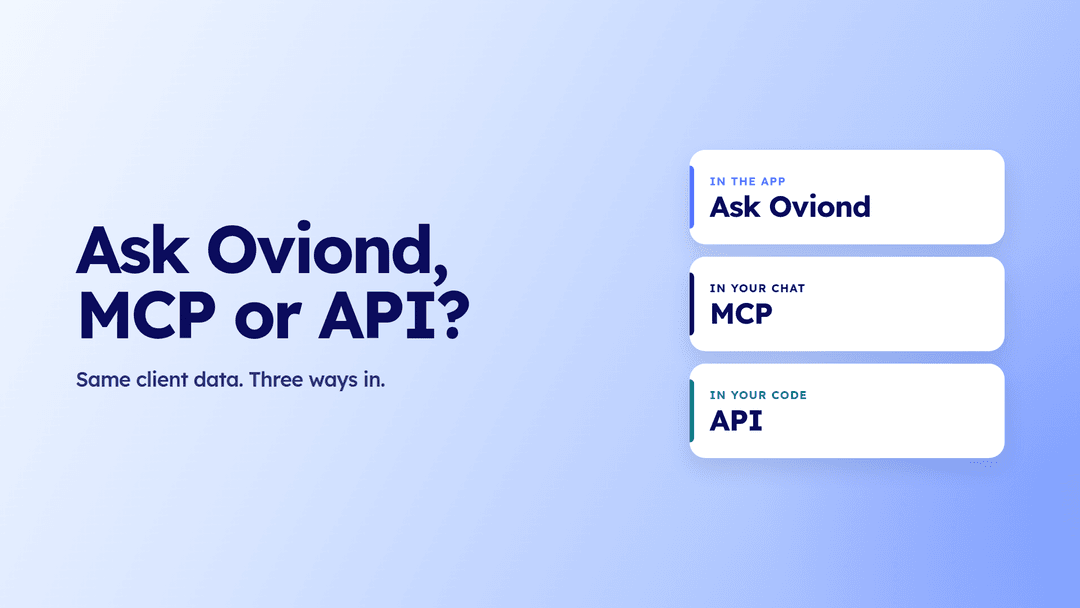
Ask Oviond is the newest way to work in Oviond, and it is the one to open first. It is the AI reporting agent built into the app. You describe the report, and it builds the pages and widgets beside the editor.
The other two ways in are the marketing MCP server and the REST API. An MCP vs API choice is about where the work happens. MCP puts your Oviond account inside Claude, ChatGPT, or Cursor. The API puts it inside code you write. All three reach the same clients, the same 100+ data sources, and the same reports. The examples use Brightpath Dental, a client of an agency called Northroom, and they compare October with September.
The short answer
Use Ask Oviond when you are in the report and want to watch each change land. Use the MCP server when your day already runs in Claude, ChatGPT, or Cursor. Use the API when a script, a Slack job, or your CRM should do the work with nobody in the chat, or when you are building your own reporting tool or portal.
If you are weighing an AI agent vs API, Ask Oviond and the MCP server are the agents. The API is the code path. You can use more than one. Build the report in Ask Oviond, ask a quick question from Claude, and let the API post the Monday numbers.
MCP vs API, and where Ask Oviond fits
MCP vs API is the question that comes up once you want Oviond outside the app. There is a third option in the product, and it shipped most recently: Ask Oviond.
| Ask Oviond | MCP server | REST API | |
|---|---|---|---|
| Who it’s for | You, while you build the report | You, in Claude, ChatGPT, or Cursor | Your code, or a developer on the team |
| Where it runs | Inside the Oviond app, next to the editor | The assistant you already have open | Your scripts, a Slack job, or your CRM |
| Setup | Open Ask Oviond in the sidebar | Paste https://api.oviond.com/mcp and sign in with OAuth |
Create a key in Settings. Keys start with oviond_ |
| Cost | Pay-as-you-go balance. A short question costs a few cents | Included on subscription plans. Does not use the Ask Oviond balance. 300 requests per minute | Included on subscription plans. 300 requests per minute. Public read-only sandbox |
| Best for | Building and editing a report while you watch | Questions and report work from the chat | Building your own reporting tool or portal, a Monday digest, or a closed deal that creates the client and the report |
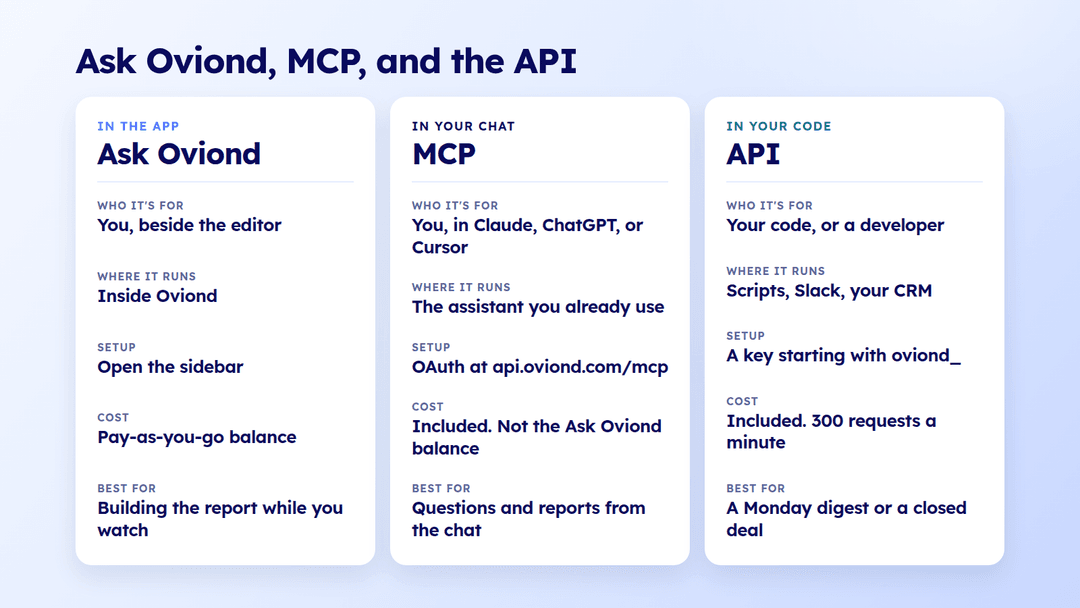
The MCP server is 125 tools at https://api.oviond.com/mcp, with an OAuth sign-in, and it does not use your Ask Oviond balance. The API is 186 endpoints, keys that start with oviond_, a public read-only sandbox, and 300 requests per minute, counted separately from MCP.
Subscription plans start at $50 a month for 10 clients ($40 billed annually), and MCP and API access are included. Lifetime plans need the API add-on. See pricing.
What Ask Oviond is
Ask Oviond is the AI reporting agent inside Oviond. We launched it on November 11, 2026. It docks to the sidebar of the normal report builder, so you see each widget appear and you can fix anything by hand.
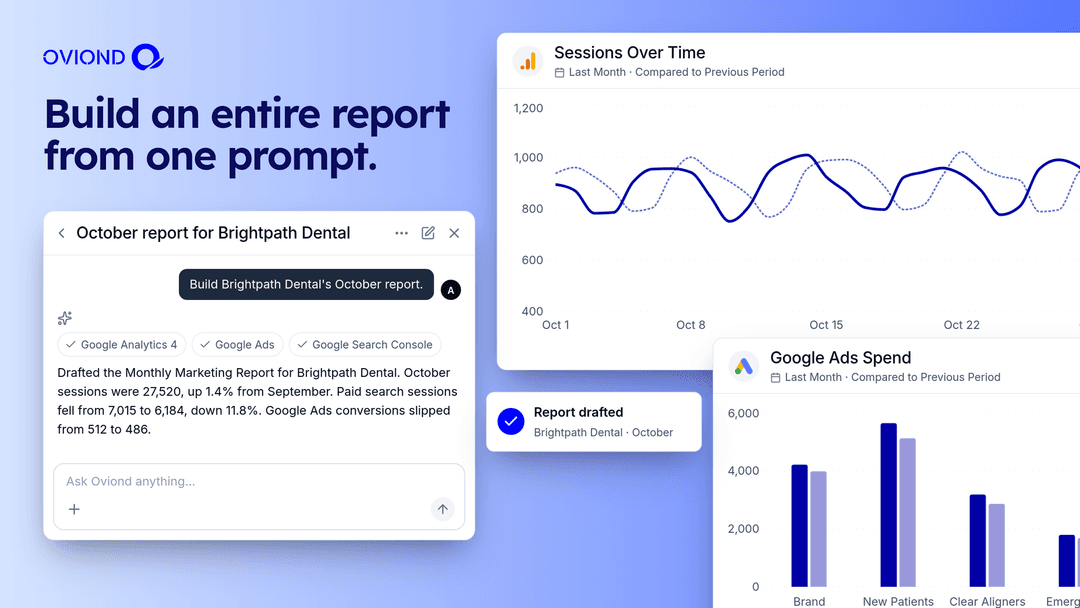
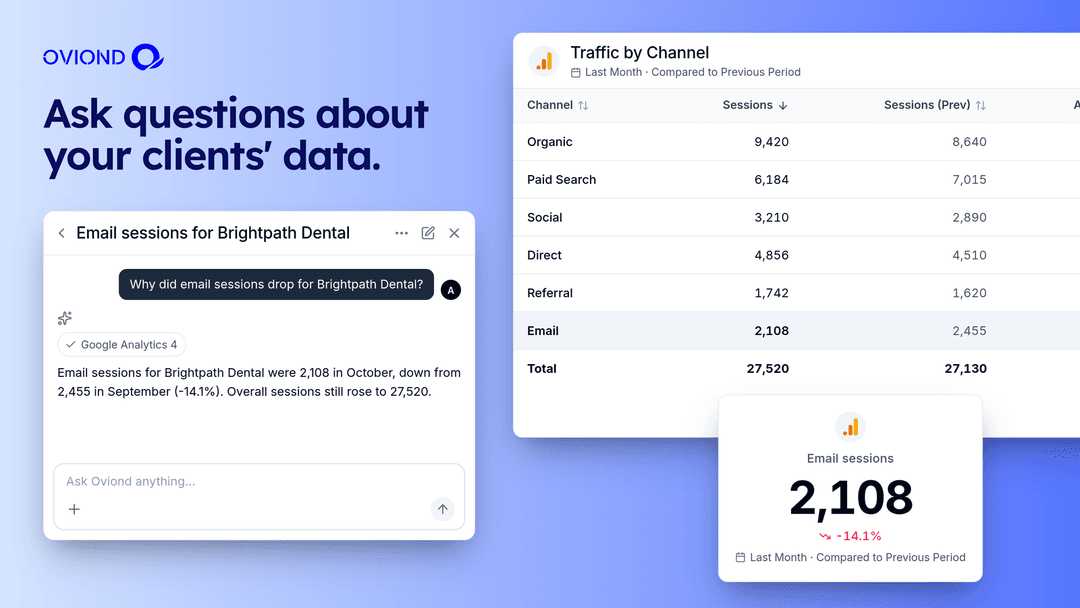
You can ask it to create a report, add widgets from a connected source, write a summary into a text widget, turn a report into a template, build a theme, and schedule the email. You can also ask a question and get an answer without building anything.
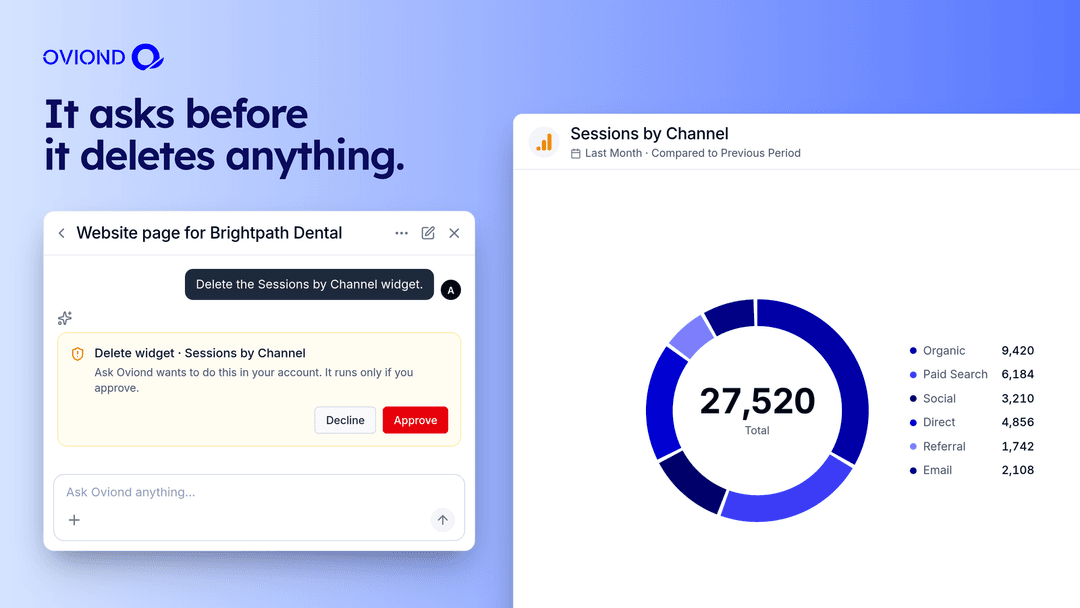
It remembers the thread, so “now do the same for the next page” works. Additions and edits go through straight away. Deletes wait.
The balance is pay as you go. Money you add never expires. A short question costs a few cents, and building a whole report from a file costs more. The full tour is in Ask Oviond: build the whole report with a prompt.
It’s in beta. Check the metric choices before anything goes to a client.
Ask Oviond Tour: The AI Reporting Assistant for Agencies
Ten prompt chains for Ask Oviond
These chains are written for Brightpath Dental, a Northroom client, comparing October with September. Copy a chain into Ask Oviond and swap the names. Results depend on the data sources that client has connected. If a source is missing, the widget cannot show live numbers.
1. Month-end report from zero
Start with an empty report and finish with two pages, a written summary, and a check for blank widgets.
1. Create a report for Brightpath Dental called October Marketing Report.
2. Add a GA4 page with KPI cards for sessions, active users, and engagement rate, comparing October 2026 with September 2026.
3. Add a Google Ads page with a campaign table for cost, clicks, and conversions over the same two months.
4. Write a 5-sentence summary of October versus September and add it as a text widget at the top of the report.
5. Check the report for empty widgets and tell me which ones need a connected source.
What you get: a two-page October report for Brightpath Dental, a short summary sitting in the report, and a list of anything that came back empty.
2. One report for every client
Build the report once at Northroom, then hand the same layout to the rest of the roster.
1. Turn Brightpath Dental's October Marketing Report into a template called Northroom Monthly Report.
2. Create that report for every other client in the Northroom account.
3. Check which clients are missing a data source the template needs.
What you get: one template, a copy of the report on each client, and a list of clients whose sources are not connected yet.
3. Pre-call briefing
Ten minutes before the Brightpath Dental call, get the change, the number they will ask about, and words you can say.
1. For Brightpath Dental, what changed across the connected sources from September to October?
2. Which number is the client most likely to ask about on the call?
3. Write three paragraphs I can say out loud, using those numbers.
4. Add the three paragraphs as a text widget at the top of the October report.
What you get: a short briefing in the chat, and the same three paragraphs saved on the report. Read it against the charts and edit any line you would not say yourself.
4. Why did it drop?
When one channel fell, pull the channel split, the pages behind it, and three bullets you can defend.
1. Break Brightpath Dental's GA4 sessions down by channel for October versus September.
2. For the channel that dropped the most, list the top landing pages in October.
3. Write three talking-point bullets I can use on the call.
4. Add those bullets as a text widget under the channel breakdown.
What you get: a channel view, the landing pages tied to the drop, and three bullets in the report.
5. Rebuild their old PDF
Attach the PDF their last agency sent and ask for that layout on live data.
1. I'm attaching Brightpath Dental's old monthly PDF. Recreate this layout in Oviond for October 2026, using live widgets on the sources we have connected.
2. Keep the same page order, and use the same metrics where Oviond has them.
3. Tell me which parts of the PDF you could not rebuild because the source is not connected.
What you get: a report the client already recognizes, now on live widgets, plus a note on anything in the file that has no connection yet. A screenshot, a spreadsheet, or a URL works the same way.
6. A theme in their color
Brightpath Dental’s main color is #0E7C86. Put it on their reports before the PDF goes out.
1. Build a theme for Brightpath Dental with #0E7C86 as the main color.
2. Apply that theme to Brightpath Dental's reports.
What you get: a theme in their color, applied to their reports. Themes, logos, and custom domains are covered on the white-label reporting page. Open one report and confirm the color landed.
7. Brand campaigns next to generic
Split Google Ads so brand and generic are not averaged into one row.
1. On Brightpath Dental's October report, add two Google Ads campaign tables side by side. Filter the first to campaigns with Brand in the name. Filter the second to the campaigns that are not brand.
2. Compare October 2026 with September 2026 on both tables, and show cost, clicks, and conversions.
3. Add a daily cost trend for October under the two tables.
What you get: two campaign tables on one page, plus a daily cost trend, so brand and generic stay separate. If the names do not contain the word Brand, follow up with the names to use.
8. Quarter review and a PDF
Compare last quarter with the same quarter a year earlier: July through September 2026 against July through September 2025.
1. Build a quarter review for Brightpath Dental comparing last quarter with the same quarter last year. Use July through September 2026 against July through September 2025.
2. Explain the biggest movers in a short text widget.
3. Make a PDF of the report.
What you get: a quarter report, a short explanation of what moved, and a PDF. Open the PDF before you send it.
9. Account health sweep
Before Northroom sends a batch, find the clients whose data will embarrass you.
1. Across the Northroom account, which clients have a broken or disconnected data source?
2. Which reports have empty widgets?
3. List the clients and the reports so we can fix the connections before month-end.
What you get: the clients with a broken or disconnected source, and the reports with empty widgets, before the batch goes out. Oviond also marks each connection Working or Needs attention.
10. A paid social page
Add Meta Ads to the October report with the numbers a social buyer actually asks for.
1. Add a Meta Ads page to Brightpath Dental's October report.
2. Include spend, CPM, CTR, and results, comparing October 2026 with September 2026.
3. Add a table of the top ads for October.
What you get: one paid social page with spend, CPM, CTR, results, and the top ads.
What the marketing MCP server is
The Oviond marketing MCP server is a hosted Model Context Protocol server. One URL, https://api.oviond.com/mcp, gives Claude, ChatGPT, Cursor, and other MCP clients 125 tools. You paste the URL and sign in with OAuth. Nothing to install.
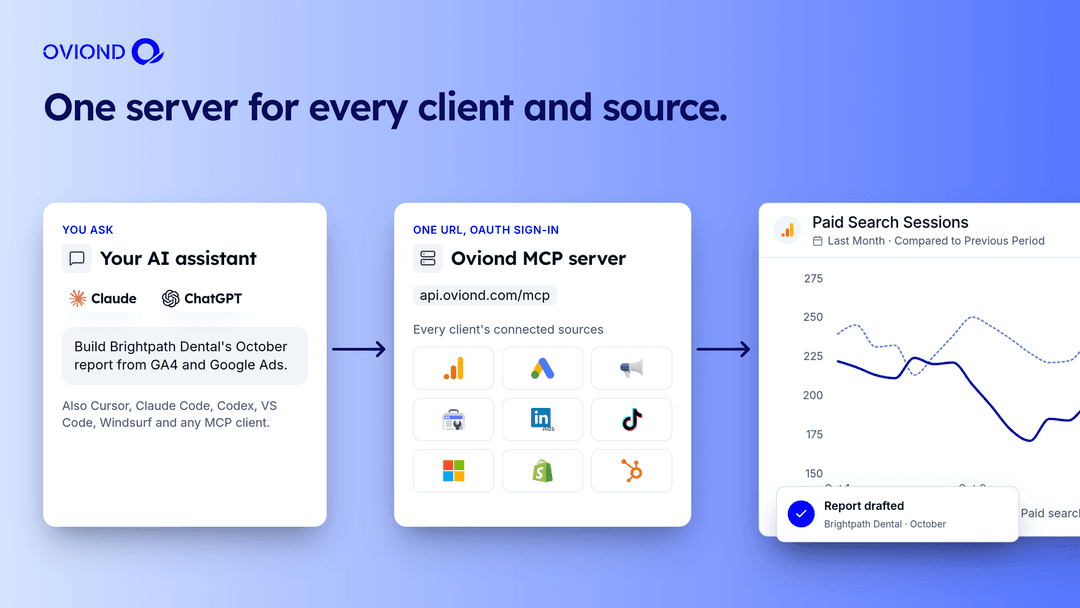
An MCP server vs API comparison comes down to who calls the tools. The assistant picks a tool from your sentence. Your code calls an endpoint by name. MCP access is included on subscription plans and does not draw on your Ask Oviond balance. Traffic is limited to 300 requests per minute per account.
Google, Meta, LinkedIn, and TikTok still need a browser sign-in in the app. The assistant reads and reports on ad data. It does not change bids, budgets, or ads.
Setup, the tool list, and the limits are in the Oviond MCP server guide. The product page is Reporting API and MCP server.
Four MCP prompts to paste into Claude
Paste one of these into Claude, ChatGPT, or Cursor after Oviond is connected. Swap Brightpath Dental for a real client.
Pull last month's Google Ads cost per conversion for every client and rank them.What you get: a ranked list in the chat, from the Google Ads accounts already connected.
Which clients' GA4 sessions dropped more than 20% month over month?What you get: the clients who fell, with the sessions behind the percentage.
Draft a client update email using Brightpath Dental's October numbers.What you get: a draft in the chat from October’s connected data. Edit it before it goes to the client.
List reports that haven't been sent this month.What you get: the reports still waiting on a send this month.
What the API is
The Oviond REST API is a JSON API at https://api.oviond.com with 186 documented endpoints under /v1. One key covers every client and every connected source. Keys start with oviond_, and an admin creates them in Settings, under API keys. The key is shown once. Treat it like a password and keep it out of front-end code.
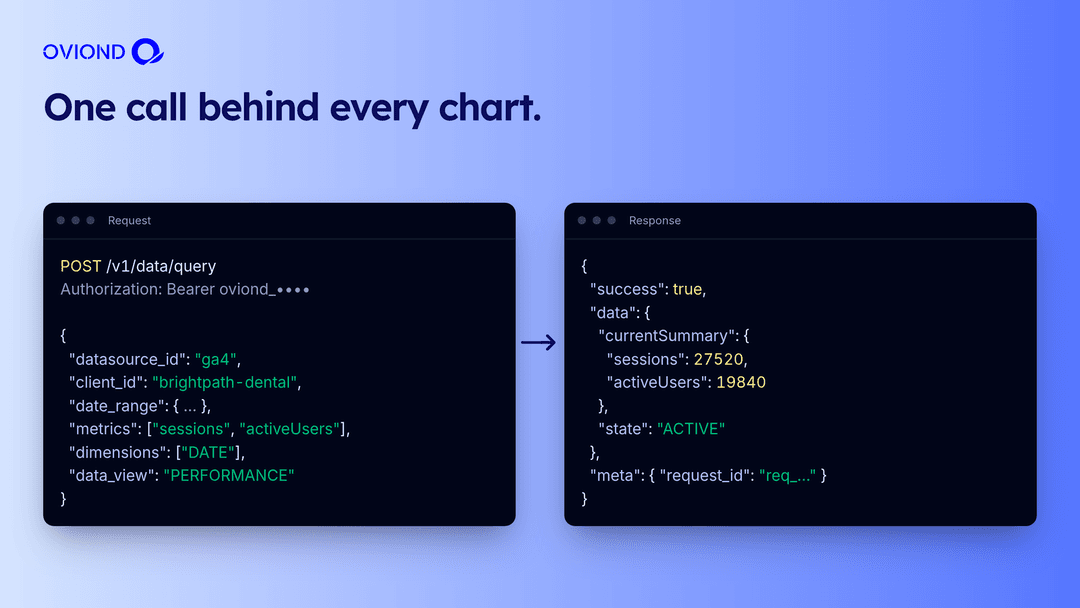
POST /v1/data/query uses the same request shape for every connected source. There is a public read-only sandbox, so you can run a call before you create a key. Write calls on the sandbox return 403. The default limit is 300 requests per minute per account, separate from MCP. The web app is never rate limited.
Building your own reporting tool? Let Oviond handle the hard stuff
If you are building your own reporting tool, client portal, or internal dashboard, use the Oviond API and let Oviond run the data layer underneath it. Build vs buy for marketing reporting spells out the monthly work. What Oviond runs:
- 100+ connectors and OAuth. Oviond maintains the connectors, platform access, and token models for 100+ data sources, and your code reaches them with one API key.
- Token refresh. Oviond refreshes tokens and checks each connection daily, including Google refresh tokens that expire after seven days while an app is in Testing and Meta tokens that last about 60 days.
- Vendor API changes and rate limits. When a platform retires a version or returns a
429, Oviond ships the version upgrade and handles the retry. - One schema across sources. Google Ads calls it cost and Meta calls it spend, and
POST /v1/data/queryuses the same request shape for every connected source. - White-label reports and monthly upkeep. White-label PDFs, scheduled email, and custom domains come through the API, and the engineering time to keep each connector working stays with Oviond.
You own the product and the UX. Oviond owns the plumbing.
Two jobs for the API
A Monday Slack digest of KPIs
Northroom wants last week’s numbers in Slack before the stand-up. A script lists the clients, calls POST /v1/data/query, and posts the moves worth mentioning. Nobody opens the editor. The same job can send email.
What you get: a Monday message from live data, on a schedule your code controls.
A closed deal creates the client and a live report
When a deal is marked closed, the CRM calls the API. POST /v1/clients creates Brightpath Dental. The next calls create a report from the Northroom template and add a monthly email automation. Connecting Google or Meta still happens in the app, because those sources need a browser sign-in.
What you get: a client record and a live report waiting in Oviond. Create the automation paused, send a test, then turn it on.
How to choose
- You are looking at the report and want it built: Ask Oviond.
- You are already in Claude, ChatGPT, or Cursor: the MCP server.
- A script, Slack, or your CRM should do the work: the API.
- You are building your own reporting tool, client portal, or internal dashboard: the API.
They share the account, so you can use more than one. Build the Brightpath Dental report in Ask Oviond, ask Claude a follow-up over MCP, and let the API create the next client when a deal closes.
Before a client sees it, spot-check a few numbers and read the summary out loud. Empty widgets usually mean the source is not connected. The result is a normal Oviond report you can edit by hand. Automated client reporting can email it once you trust the pages.
How to set each one up
Ask Oviond. Log in, open a client, and open Ask Oviond in the sidebar. It draws on a pay-as-you-go balance. Connect the client’s data sources, then paste the first chain.
MCP. In Claude, open Settings, then Connectors, and add https://api.oviond.com/mcp. Sign in when the Oviond window opens. In ChatGPT, add the same URL as a custom connector. In Cursor, put the URL in ~/.cursor/mcp.json and sign in on the first tool call. Ask it to list your clients to confirm the account. The MCP overview has the click path for each client.
API. An admin goes to Settings, then API keys, names the key, and picks View, Edit, or Full access. The key is shown once and starts with oviond_. To try a call before that, use the public sandbox in the API docs.
OAuth sources still get connected in the app for all three. That sign-in is once per source.
FAQ
What is the difference between MCP and an API?
MCP vs API is a question about who does the calling. The Oviond MCP server gives Claude, ChatGPT, or Cursor 125 tools after you sign in with OAuth at https://api.oviond.com/mcp. The API gives your code 186 endpoints and a key that starts with oviond_. Ask Oviond is the third option: the agent inside the app, on a pay-as-you-go balance.
Do I need to code to use Ask Oviond?
No. Ask Oviond is built into the Oviond app. You type what you want in plain English. It adds and edits right away, and it asks for approval only before a destructive action, such as deleting a client or a widget.
Does MCP use my Ask Oviond balance?
No. MCP access is included on Oviond subscription plans. Using the MCP server does not draw on your Ask Oviond balance. Questions you ask inside Ask Oviond are the ones that use that balance.
When should I use the API instead of Ask Oviond?
Use the API when a script should run with nobody in the chat, or when you are building your own reporting tool or portal. A Monday Slack digest of client KPIs, or a closed CRM deal that creates the client and a live report, are API jobs. Use Ask Oviond when you want to watch the report change.
Can I use Ask Oviond, MCP, and the API on the same account?
Yes. All three reach the same account, the same clients, and the same connected data sources. You can build a report in Ask Oviond, ask a follow-up from Claude over MCP, and pull the same numbers from your own code.
Which data sources can Ask Oviond, MCP, and the API reach?
Any of the 100+ data sources the client has connected in Oviond. Google, Meta, LinkedIn, and TikTok still need a browser sign-in in the app before Ask Oviond, the MCP server, or the API can read them.
Log in and run the first chain
Log in to Oviond, open Ask Oviond on a client that already has sources connected, and paste the month-end chain.
New to Oviond? Start a 15-day free trial, no card required. Connect one client’s data sources and run the same chain.