
Oviond Blog
White Label SEO Audit Guide for Agencies
Build a white label SEO audit your agency can deliver at scale. Covers audit scope, KPIs, templates, dashboards, automation, and pricing.

Your monthly SEO report is due, the client wants something branded, and the crawl dump still lives in three spreadsheets, a Screaming Frog export, and a half-finished Looker Studio file. That's usually the point where a white label SEO audit stops being a nice idea and becomes a workflow problem, because the team needs something repeatable, client-facing, and defensible without rebuilding the same deck every month.
A good audit here isn't just a PDF with your logo on it. It's a productized reporting process that starts with technical evidence, gets validated, then lands in a branded dashboard or report the client can use. For agencies managing recurring reporting across multiple accounts, that difference matters more than the cover page.
Table of Contents
- What a White Label SEO Audit Is
- What to Audit and How to Run the Crawl
- Core Metrics and KPIs to Surface to Clients
- Reusable Audit Templates and Brand Assets
- Building Live Dashboards and Branded Reports in Oviond
- Automation, Scheduling, and Client Delivery
- Pricing, Packaging, and FAQs
What a White Label SEO Audit Is
A client signs off on a retainer, then expects the agency to explain what's broken, what matters first, and what happens next. If the audit only exists as a one-off spreadsheet, someone on the team ends up rewriting the same findings into a deck, then into an email, then into a task list. That is the part that scales badly.
A white label SEO audit has two layers. The first is the technical audit layer, where the site is crawled, checked, and validated. The second is the branded reporting layer, where those findings are turned into a client-ready deliverable that carries the agency's identity across the whole experience, not just the cover page. One useful distinction from Boocoo's SEO outsourcing advice is that agencies often outsource execution, but the value stays in how the findings get packaged and explained.
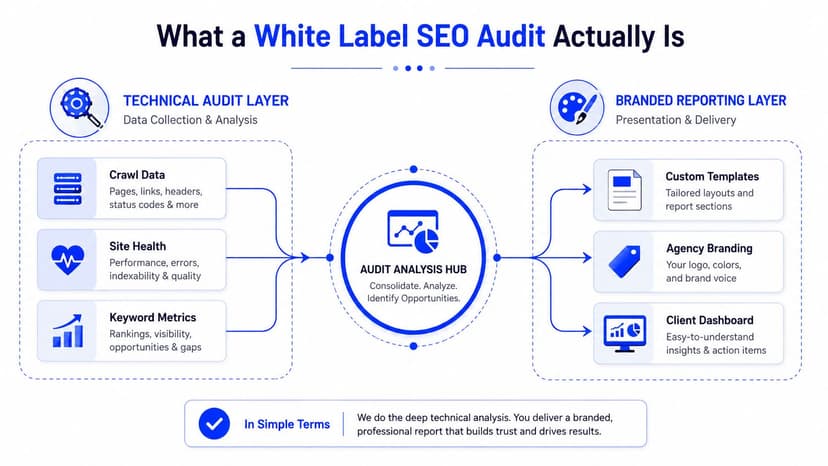
Three buyers for the same service
The same audit product usually serves three jobs. Retainer clients need ongoing issue detection and reporting. New business prospects need a clear diagnosis that opens a sales conversation. Technical due diligence clients need a fast read on whether the site is healthy enough to support growth.
The mistake is treating branding as the main feature. The key feature is whether the report can be trusted, reused, and handed into delivery without a second round of manual cleanup.
A lot of teams still think of this as a static PDF exercise, but modern white-label tools now package site speed, Core Web Vitals, index coverage, mobile usability, crawl errors, structured data, rankings, backlinks, and GA4/Search Console data into branded dashboards and reports, with some tools advertising 90+ checks across 10 modules or 100+ site parameters (Sitechecker white-label overview). That is a strong sign the category has moved beyond basic crawl diagnostics.
If you are building this into an agency workflow, the reporting layer should sit next to your normal client reporting system, not outside it. Oviond's own explanation of SEO reporting fits that model well, because the report is treated as a live client asset, not a file you send and forget.
What to Audit and How to Run the Crawl
A usable white label SEO audit starts with a crawl, but the crawl is only the first pass. Crawlers are good at finding patterns, and they are also good at making a problem look bigger than it is if you do not check the output against Google Search Console and the live page. A solid workflow starts with crawl data, checks the important findings in secondary sources, then packages only the evidence you would hand to a client without editing on the fly.
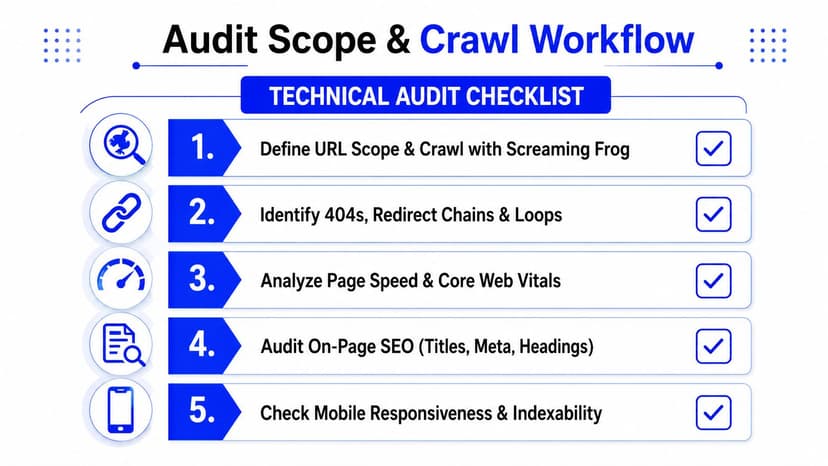
The crawl logic that holds up
Start with a site crawl in a tool like Screaming Frog so you can see sitewide patterns fast. Then validate the important findings in Google Search Console and on live pages. After that, package each issue with the URL, issue type, affected count or share, source, screenshot or code snippet, and reproduction steps so the report is ready to hand over.
The scope needs to cover five modules:
- Crawl and indexation, including canonical tags, robots directives, sitemap references, response codes, and coverage gaps.
- Performance and Core Web Vitals, with pass thresholds that matter to clients.
- On-page and content, including titles, headings, metadata, and thin or duplicated patterns.
- Structured data and schema, especially where rich result eligibility is at stake.
- Backlinks and off-site signals, when external authority needs to be preserved or redirected.
A good agency audit does not flag every warning and dump it into a deck. It groups issues by template, removes repeats, and scores each finding by impact, effort, and confidence before anything goes into the ticketing system. That keeps the output useful for delivery instead of turning it into noise.
For teams building their tool stack, this list of SEO tools that support audit work is a practical starting point for choosing where crawl data, reporting, and handoff work need to live.
Crawl data on its own can make a minor issue look urgent, or hide a major template error behind hundreds of low-value warnings.
What belongs in the report line by line
Each issue should show the affected URLs, the source of truth, and the reproduction path. The practical standard from the technical guidance is to include coverage and issue status from GSC, canonical and robots details, sitemap references, and example affected URLs for each indexation problem (Searcle's audit workflow guide). That turns a raw export into a remediation plan your team can use.
The checklist should also cover AI visibility and SERP feature opportunities where they matter, because clients care about more than blue links. Featured snippets, People Also Ask, and AI Overviews are now part of the working scope in newer guidance, and leaving them out makes the audit feel behind the market (MetricsWatch on white-label audit scope).
Built this way, the audit is easier to defend in a client call, easier to turn into tasks, and easier to refresh next month without rebuilding everything from scratch.
Core Metrics and KPIs to Surface to Clients
A client does not need every crawl flag dumped into a report. They need to see which issues affect visibility, traffic, and conversions, and those metrics need to be translated into plain language. The agency view and the client dashboard serve different jobs, so keep them separate.
Keep the technical layer in the agency view
Some fields belong in the working file, not the client readout. Canonicalization, robots directives, sitemap coverage, server response codes, and hreflang explain why a page behaves the way it does. They matter for diagnosis, but they do not belong as headline metrics for a non-technical stakeholder.
One audit checklist source says the technical SEO audit should cover crawlability, indexation, page speed, mobile-friendliness, HTTPS, structured data, XML sitemaps, and server configuration, and it lists Core Web Vitals pass thresholds as Largest Contentful Paint under 2.5 seconds, Interaction to Next Paint under 200 milliseconds, and Cumulative Layout Shift under 0.1 (SEOscore tools audit checklist). Use those as pass or fail gates in the report logic, not as a wall of numbers. For a broader view of which SEO measurements usually matter most in client reporting, this overview of important SEO metrics is a useful reference point.
Put business language on the dashboard
The client-facing side should surface:
- Organic sessions, because it shows whether search traffic is moving.
- Organic conversions, because traffic without outcomes gets ignored.
- Keyword visibility, because it frames discoverability without burying people in rankings.
- Core Web Vitals pass rate, because it turns a technical benchmark into an easy status read.
- Indexation rate, because it shows whether important pages are being seen.
If a metric cannot help someone decide what to fix first, it belongs in the appendix, not the front page.
The language needs context, not jargon. Instead of saying “index coverage dropped,” say “important pages are being excluded from search, so we need to check canonical, robots, and sitemap signals.” That turns the report into something the account team can use in a review meeting.
If you already track reporting on a monthly or quarterly cadence, keep the audit tied to a 30/60/90-day action plan. A good audit should not end as a static to-do list. It should tell the account manager what to watch first, what to delegate, and what to revisit after implementation.
Reusable Audit Templates and Brand Assets
Scaling audits across clients gets messy fast when every report starts from scratch. The teams that keep this under control build a master template once, then reuse the same structure, scoring language, and branded assets every time. That's where the operational win sits.
What belongs in the master template
A reusable audit template should contain the pieces that never change much from account to account:
- Audit cover, with the agency identity and client name.
- Executive summary, written for the person who approves work.
- Issue prioritization matrix, so priority isn't based on crawl order.
- Remediation plan, with next steps and ownership.
- Recurring KPI snapshot, so the report stays connected to the ongoing dashboard.
That is also where the branded look matters. A white-label report should carry the agency's branding through headers, footers, colours, and typography, not just the first page. AuditHQ makes that point clearly, and it's the right standard to hold here because the client experience should feel consistent from the PDF to the dashboard (AuditHQ's report guidance).
What belongs in the reusable asset library
The asset library is where the time savings live. Keep issue descriptions, severity scoring rubrics, and recommended fix snippets in one place so the team isn't rewriting the same explanation about duplicate titles, redirect chains, or missing canonicals every month. The same logic applies to screenshots, code examples, and short “what to do next” notes.
Oviond's reporting templates are a good example of this approach on the reporting side, because templates reduce setup friction and help standardize delivery across client accounts.
A template should remove decision fatigue, not force the account manager to translate every technical finding from scratch.
The test is consistency. If a junior account manager can build the first version of the audit using the same scaffolding a senior strategist would use, the system is working. If not, the template is just another file with nicer formatting.
Building Live Dashboards and Branded Reports in Oviond
A white-label audit gets a lot easier when the report lives inside a reporting platform instead of a spreadsheet pile. Oviond is built for agency reporting, and the main reason to use a system like this is simple, it keeps the audit tied to the client's other performance data instead of sitting off to the side.
Connect the audit to the rest of the account
Oviond supports 70+ integrations, including Google Analytics 4, Google Ads, Facebook Ads, LinkedIn Ads, Microsoft Ads, Google Search Console, Mailchimp, YouTube, and custom Google Sheets imports. That matters because an audit report gets more useful when it sits next to traffic, conversion, and campaign data, not separate from it.
The platform's drag-and-drop builder is what makes this practical. You can assemble metrics, charts, text, and notes without code or spreadsheet work, then use prebuilt queries, custom queries, calculated metrics, and goals to show the exact KPI view the client needs. For an agency, that means the technical findings can live in the same place as the business context.
White-label delivery mechanics that matter
The white-label side is where delivery feels clean. Remove vendor branding, apply a custom domain for the client-facing view, set a custom email sender, and choose whether the client gets a live dashboard, a scheduled PDF, or an embedded view. Those details sound small, but they're what keep the report feeling like an agency asset.
A useful way to structure the deliverable is to make the dashboard the living surface and the PDF the summary. That way the client can check the always-current view, while the PDF acts as the takeaway from the audit review.
The dashboard should carry the ongoing story. The PDF should carry the signed-off action list.
There's also a workflow angle here. Oviond's AI and MCP-assisted setup helps teams spin up reporting structures faster, which is useful when the agency needs a repeatable framework across many clients rather than a one-off build. That doesn't replace strategy, but it does remove some of the setup drag.
When the audit sits inside the same reporting system as the rest of the account, the agency stops rebuilding the same deliverable in multiple places. That's the difference between reporting that feels patched together and reporting that feels operational.
Automation, Scheduling, and Client Delivery
Manual delivery is where audit workflows start leaking time. Someone exports the data, someone else checks the PDF, then the client asks for the latest version three days later and the whole thing gets repeated. Automated delivery fixes the repeat work, but only if the report is built to send itself cleanly.
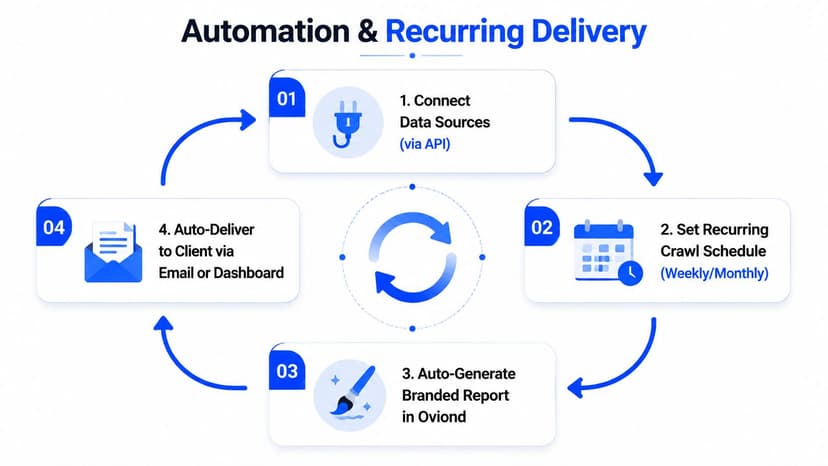
Build the delivery loop once
The delivery loop should be straightforward. Connect the data sources, set the recurring crawl or refresh schedule, auto-generate the branded report, then deliver it by email or dashboard link. That's the point where the audit stops being a project and becomes a service.
Automation is also why unlimited team access matters in agency software. Oviond supports unlimited users without per-seat fees, plus full API access, so teams can plug reporting into the tools they already use instead of creating another silo. That matters more than it sounds, because delivery breaks down fastest when only one person knows how the report is assembled.
Make the client-facing habit simple
The most effective delivery habit is boring, and that's a good thing. Send a one-page executive summary that a client can scan quickly, attach the audit to the QBR rhythm, and keep the live dashboard link as the primary surface. The PDF should be the takeaway artifact, not the place where the client first learns what's happening.
A practical operational note, keep the report always-current so nobody has to ask for “the latest version.” That one habit alone cuts down on version-chasing and awkward follow-up emails. It also makes the report feel more like a service layer and less like a file transfer.
If the report needs a manual refresh every time someone opens it, it isn't really automated yet.
For agencies managing many accounts, that's where the system either holds or falls apart. A strong reporting platform doesn't just send prettier PDFs, it removes the monthly rebuild from the process entirely.
Pricing, Packaging, and FAQs
A white-label audit should be sold as a paid product, not a free favour. Agencies can package it as a one-off diagnostic, but it usually makes more sense as a retainer add-on or a recurring reporting service because the value comes from the baseline, the follow-up, and the next set of actions.
Package it around scope, not just page count
A clean way to tier the offer is basic, standard, and premium. The basic version can cover core crawl and indexation checks. The standard version adds performance, structured data, and content priorities. The premium version includes deeper validation, multi-domain work, and AI visibility or SERP feature checks where they're relevant.
That structure keeps the conversation commercial instead of technical. The client buys clarity on what gets fixed first, not a giant checklist. Agencies should also be clear about who owns implementation, because a roadmap without a delivery owner tends to sit unused.
Oviond's pricing model is built to support this kind of packaging. It starts from $40 per month billed annually for 10 clients, scales by client count, and includes unlimited reports and dashboards in one plan. That makes it easier to protect margin as the client list grows, especially when reporting volume climbs faster than the team headcount.
Common buyer questions
- How often should the audit refresh? Use the cadence that matches the client's change rate. Fast-moving sites need more frequent checks, while stable sites can live on a slower review rhythm.
- What about multiple domains or international SEO? Scope each domain and language setup separately, then roll the findings into one client view.
- How do AI visibility checks fit in? Add them to the standard scope when the client depends on answer-led search features or content discovery beyond classic rankings.
- Should the report replace the dashboard? No. The dashboard stays live, and the report captures the signed-off action list.
If you're comparing reporting platforms, keep the trade-off simple. AgencyAnalytics, Whatagraph, Swydo, and Looker Studio can all support agency reporting in different ways, but the thing to judge is how much manual assembly they leave behind, how consistent the white-label experience stays, and whether the workflow fits a multi-client team without extra cleanup.
If you're ready to turn audits into a repeatable client reporting product, see what Oviond can do for branded dashboards, scheduled delivery, and multi-client reporting. It's built for agencies that want one workflow for SEO audits, ongoing reporting, and client-facing delivery without the spreadsheet mess.
Related articles
Simplify marketing reporting today
Stop juggling multiple tools. Start presenting clear, automated reports your clients will love