
Oviond Blog
7 Sample Website Audit Report Examples
Compare 7 sample website audit report formats for agencies, with KPIs, annotations, client messaging, and Oviond implementation notes.

Most advice about a sample website audit report starts with the score. That's usually the wrong starting point. A score can help a client understand urgency, but it doesn't tell the account manager what to fix, who owns the work, or whether the problem affects leads, rankings, conversion paths, or reporting quality.
For agencies managing 5–50+ clients, the useful format is a client-ready operating document. It connects technical findings to business priorities, shows page-level evidence, assigns practical next steps, and can be reused without rebuilding a spreadsheet every month. I'm evaluating the examples below as reporting blueprints, not just attractive exports. Each review considers purpose, structure, visual evidence, recommended KPIs, client messaging, recurring delivery, and how the workflow can be recreated in Oviond.
Oviond works as the white-label reporting layer around that process. It brings analytics, paid media, SEO, email, CRM, and e-commerce data into branded dashboards and scheduled reports, so an audit can sit beside the performance data clients care about. Its position is simple: agency reporting that finally feels simple.
Table of Contents
- 1. Oviond
- 2. AgencyAnalytics
- 3. SEOptimer
- 4. CrawlRaven
- 5. Web Audit Suite
- 6. Auditora
- 7. Flowpoint Marketing
- Sample Website Audit Report, Top 7 Tools Comparison
- Turn the Winning Format Into a Repeatable Workflow
1. Oviond
Oviond fits agencies that need an audit to support recurring client reporting, rather than sit as a one-time PDF. It combines analytics, advertising, SEO, email, CRM, and e-commerce data in branded dashboards and scheduled reports. Product details on Oviond's website list 70+ data sources, prebuilt templates, a drag-and-drop builder, calculated metrics, goals, reusable assets, and automated delivery.
Use the audit dashboard as an operating document. Start with a plain-English summary, then connect technical evidence to business impact. Relevant measures include crawlability, indexed pages, status-code patterns, site speed, Core Web Vitals, organic clicks, impressions, conversion rate, and the client's primary lead or revenue goal. If the issue affects acquisition beyond organic search, add paid search, email, CRM, or e-commerce data.
Practical rule: Every audit finding should answer three questions, what happened, why the client should care, and what happens next.
What works and what needs attention
Oviond's value is consolidation. Agencies can use unlimited reports, unlimited dashboards, unlimited users, white-label delivery, custom domains, custom email senders, full API access, and one plan with all features. Pricing scales by client count, starting at $40 per month when billed annually for 10 clients, or $50 month to month, based on the supplied product details. The platform also provides a 15-day free trial with all features available.
The trade-off is configuration time. A basic template can go live quickly, while merged metrics, custom calculations, goals, and customized layouts need more setup. Test the exact PDF or export format, especially when the report depends on specific connectors, before making it the agency standard.
For audit packaging, use the white-label SEO audit reporting workflow to give every finding a consistent structure: affected URL, issue type, evidence, impact, and reproduction details. Annotate screenshots or crawl excerpts so clients can see where the problem occurs, then phrase the recommendation as an action with an owner and expected business effect. Add a client-facing KPI panel and schedule delivery. Oviond is used by 3,000+ agencies, and its product details list Capterra sentiment of approximately 4.3 out of 5, with users commonly praising polished reports, support, and reduced manual work.
2. AgencyAnalytics
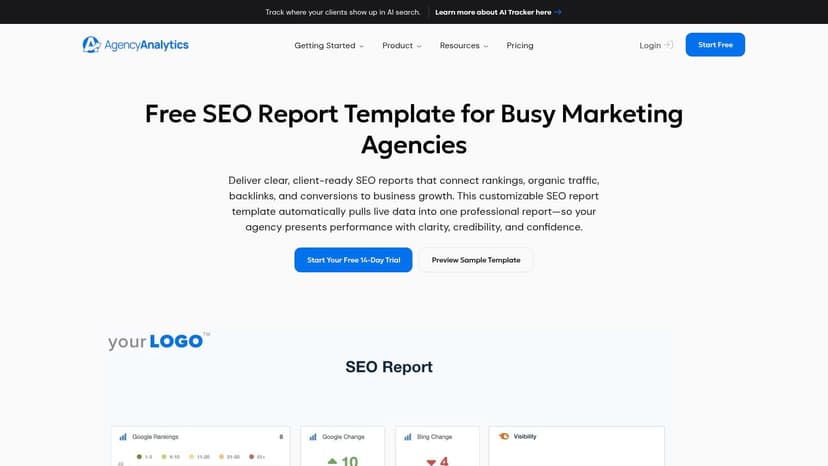
AgencyAnalytics is a good reference when the agency wants an executive-ready SEO report layout before deciding how much technical detail belongs in the final deliverable. Its SEO report template can be previewed before signup and demonstrates a clear relationship between search visibility, rankings, backlinks, conversions, and client goals. That makes it useful as a presentation model, even when the underlying crawl is performed in another specialist tool.
The format works well for a monthly account review. Lead with organic sessions or clicks, branded and non-branded visibility where available, ranking movement, conversion activity, and key audit changes. Keep the technical findings in a separate section, with screenshots or excerpts from Semrush, Screaming Frog, Lighthouse, or another crawler. That prevents the executive section from becoming a list of HTTP errors and duplicate metadata.
How to adapt the structure
AgencyAnalytics lists 85+ integrations, including Google Search Console, GA4, Semrush, Moz, and embeddable Lighthouse or PageSpeed data. Those connections support a report that shows whether a technical recommendation is associated with a change in search or user experience metrics. The platform also supports white-label reporting, scheduling, and automation, which suits recurring client communication.
The limitation is important. Full site-audit crawling isn't native, so the agency will usually need to import findings from other tools. That can create an extra handoff between the crawler, the reporting platform, and the account manager. Pricing is also structured per client, which agencies should model carefully as account volume grows.
For teams comparing reporting stacks, the agency advertising reporting comparison shows why the reporting layer matters beyond the audit itself. Recreate the AgencyAnalytics layout in Oviond by placing the executive summary first, adding a technical findings panel beneath it, and connecting the same dashboard to paid media, email, CRM, or e-commerce outcomes. That keeps the audit connected to the account rather than isolated in an SEO-only report.
3. SEOptimer
SEOptimer is built around the fast, client-friendly audit. Its website audit platform produces customizable white-label PDF and HTML reports, with 100+ checks across technical, on-page, and performance areas. For agencies running prospecting campaigns or sending a first diagnostic after a sales conversation, that simplicity can be more valuable than a dense technical export.
The report style is easy for a non-technical client to scan. A branded cover, visible categories, issue explanations, and short recommendations create a natural conversation starter. It also supports automated and bulk reporting, multilingual output, and embeddable audit forms, which makes it practical for agencies that use audits as part of lead generation.
Where the format falls short
A score-led report can create false confidence if the agency doesn't add business context. A client may understand that performance or on-page SEO needs attention, but still won't know whether the first priority is a high-value service page, a broken form, a slow template, or a tracking issue. Account managers should annotate each major finding with the relevant URL, affected template, evidence screenshot, expected business consequence, and owner.
The higher-tier availability of embed, API, and bulk features is a real consideration for multi-client operations. Sample report pages may also be gated or rate-limited in some regions, so agencies should confirm access and output options before basing a delivery process on them.
The SEO report sample from Oviond provides a useful way to extend this model. Use SEOptimer's concise presentation as the front layer, then recreate it in Oviond with a technical score panel, a page-level evidence section, and KPI cards for organic traffic, conversions, and Core Web Vitals. Schedule the branded dashboard instead of exporting a new PDF whenever the client needs an update.
4. CrawlRaven
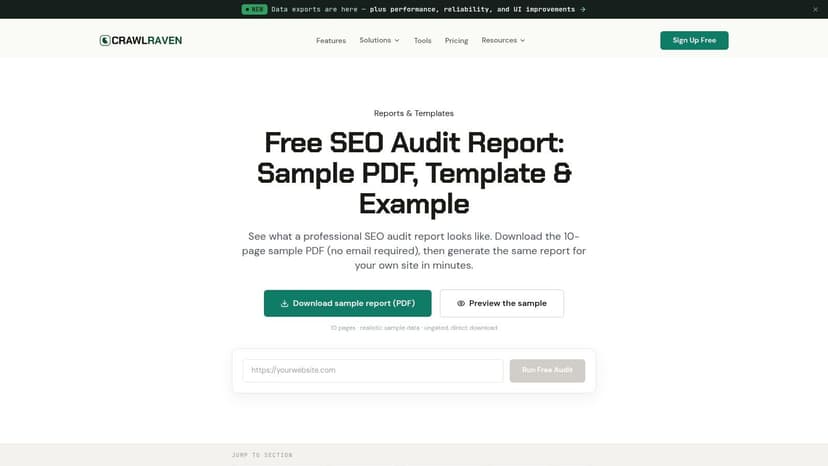
CrawlRaven offers a more complete model for agencies that want the audit itself to carry a prioritized action plan. Its SEO audit report example combines a 200-point crawl with Google Search Console, GA4, and optional Ahrefs or Semrush inputs. The public sample includes an executive summary, an overall health score, technical and on-page sections, Core Web Vitals, links, structured data, and recommended actions.
That combination is valuable because it puts diagnostic evidence beside actual search and usage data. A report shouldn't merely say that a template has a performance issue. It should show the affected page group, the field measurement, the relevant search or conversion context, and the decision the client needs to make.
Make prioritization visible
CrawlRaven's structure is particularly useful for client communication because prioritization appears inside the sample rather than being left for the account manager to explain verbally. The downloadable template and PDF also give agencies a concrete reference for page order, section labels, and executive-level summaries.
The trade-off is plan dependency. Export, API, and advanced integration depth vary by plan, and the tool has a smaller third-party review footprint than older crawler platforms. That doesn't make the format unusable, but it does mean agencies should validate the connectors and white-label controls against their own client mix.
To recreate the workflow in Oviond, use a top-level health and priority view, followed by KPI trends and evidence cards. The website performance optimization report guide can help shape the performance section. Phrase recommendations as decisions, not observations: “Replace the blocking asset on the service-page template before expanding paid traffic,” is more useful than “Improve page speed.”
5. Web Audit Suite
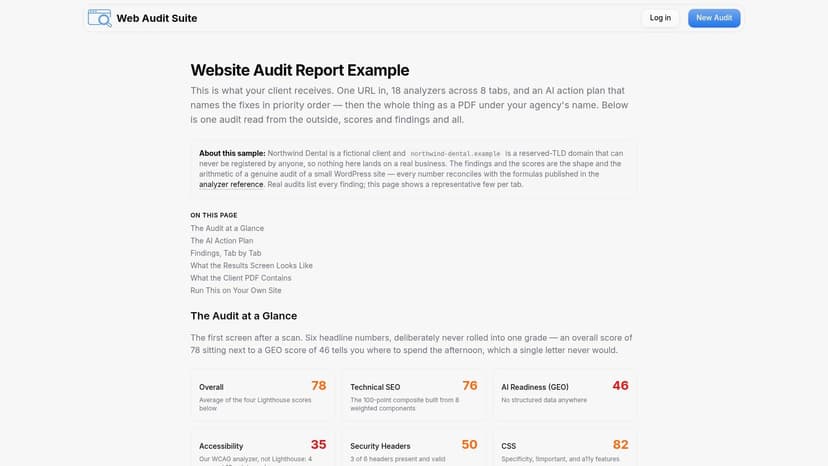
Web Audit Suite is a strong example of transparency. Its public sample report shows the report sections, scoring logic, analyzer references, and an AI-generated action plan. The sample includes technical SEO, Lighthouse-based speed analysis, accessibility, and security headers, creating a broader audit than a standard SEO scorecard.
That breadth helps agencies explain why website quality is not one problem. A page can have sound metadata and still create friction through slow rendering, inaccessible controls, weak security headers, or an unclear conversion path. Separating those categories lets the account manager assign the right owner, whether that's SEO, development, UX, or analytics.
Use AI as an assistant, not the account manager
The AI action plan is useful for turning findings into draft recommendations, particularly when the report shows how each recommendation maps back to a finding. The agency still needs to review the wording, confirm the evidence, and remove advice that doesn't fit the client's platform or business priority.
White-label PDF output and JSON export or API access are reserved for higher plans, and the ecosystem is smaller than that of larger incumbent tools. Those limitations matter when an agency needs to connect audit results to a larger reporting process.
In Oviond, use this sample as a model for separating diagnosis, evidence, and action. Add a short client note beside each issue, then connect technical changes to GA4 conversions, Search Console clicks, advertising performance, or CRM outcomes. The audit becomes more useful when the recommendation appears beside the metric the client will use to judge progress.
6. Auditora
Auditora keeps the audit compact. Its sample report shows an overall grade, prioritized issues, and page-level evidence, with a direct path to run another audit. That makes it a useful reference for agencies that need a quick client explanation rather than an exhaustive technical appendix.
The format works especially well for a first-pass review of a small site. It gives the client a visible starting point, shows where the issue appears, and avoids burying the recommendation inside a long export. The web and PDF outputs also make it easy to adapt the presentation for a call, proposal, or follow-up email.
Keep the short report honest
The risk is that concise reports can omit the context an agency needs for recurring account management. Lower-priced plans have page caps and other limits, while the platform has fewer enterprise-grade features and integrations than larger suites. Agencies should therefore treat Auditora as a fast diagnostic format, not automatically as the complete monthly reporting environment.
A useful adaptation is to keep the grade and prioritized issue list at the top, then add a second layer for business evidence. Include organic clicks, conversion actions, landing-page performance, paid traffic quality, and the client's agreed goal. For each issue, add a note such as, “This affects the template used by these landing pages,” or, “We'll validate the change against form completions after deployment.”
Oviond can reproduce that concise experience with a reusable dashboard template. Use calculated metrics for blended views, goals for agreed targets, and reusable text blocks for recommendation language. That gives account managers a consistent format without forcing every client into a generic scorecard.
7. Flowpoint Marketing
Flowpoint Marketing provides an agency-curated sample rather than a software-generated audit dump. Its sample website audit report emphasizes screenshots, commentary, readability, and practical next steps. The approach is designed for small and mid-sized business clients who need a strategist to explain what matters, not a crawler to display every detectable issue.
This format earns trust through interpretation. It focuses on first impressions, SEO basics, mobile usability, and the conversion path, then uses plain English to explain why a change matters. The free audit flow and strategist follow-up also show how an agency can use the report as the beginning of a service conversation.
Borrow the editorial judgment
The main strength is human curation. A client sees a short list of meaningful opportunities, supported by visual evidence and an explanation of what to do next. The limitation is equally clear, it isn't a software product, and the sample has less technical depth than an itemized crawler report.
For recurring reporting, use Flowpoint's editorial style on top of structured data. Select the findings that affect the client's priority pages, add screenshots or snippets, and explain the consequence without blaming the client or developer. Then separate the technical appendix from the decision page so stakeholders can act quickly while specialists retain enough detail to implement the fix.
Oviond is useful here as the delivery layer. Build a branded dashboard with a short narrative panel, evidence cards, KPI trends, and an action queue. Combine audit inputs with GA4, Google Search Console, advertising, social, email, CRM, or e-commerce data so the client sees the website in the context of the full acquisition journey.
Sample Website Audit Report, Top 7 Tools Comparison
| Tool | 🔄 Implementation (complexity) | ⚡ Resource requirements (cost & integrations) | 📊 Expected outcomes (results/impact) | 💡 Ideal use cases | ⭐ Key advantages |
|---|---|---|---|---|---|
| Oviond | Medium–High, drag‑drop builder with initial configuration and merged metrics setup | Per-client pricing (from $40/mo annual), connects 70+ sources, API access, unlimited users | Branded live dashboards, scheduled white‑label reports, automated delivery | Agencies needing an all‑in‑one, scalable reporting platform | Full white‑labeling, broad connectors, AI-assisted report building |
| AgencyAnalytics | Low–Medium, ready-made templates and quick preview reduce setup time | Per-client pricing; 85+ integrations (GSC, GA4, Semrush/Moz) | Executive-ready SEO report templates and automated client reports | Agencies wanting polished SEO report layouts to mirror | Strong SEO templating and rich integrations for client reports |
| SEOptimer | Low, plug‑and‑play PDF/HTML audits with customization | Tiered pricing; advanced embed/API/bulk features on higher plans | Consumer-friendly, white‑label audits with 100+ checks and bulk options | Lead‑gen workflows, bulk prospecting and client audit deliverables | Large rule set (100+ checks), embeddable lead‑gen forms, easy branding |
| CrawlRaven | Medium, 200‑point crawl plus configuration for data sources | Free tier for small crawls; paid plans for larger sites and optional Ahrefs/Semrush | Prioritized action plans, overall health score, downloadable sample reports | Technical audits grounded in GSC/GA4 data with prioritization | Integrates search & analytics data; clear prioritization and templates |
| Web Audit Suite | Medium, full audit pipeline with AI summary generation | Higher tiers for white‑label PDF and JSON/API exports | Transparent scores, AI‑generated action plans across SEO, performance, accessibility | Agencies needing transparent scoring and AI recommendations | Transparent scoring logic and AI mapping from findings to actions |
| Auditora | Low, 1‑click audits, minimal setup | Free and low‑cost plans; limits on pages/exports at lower tiers | Concise graded audits with page‑level evidence and quick outputs | Quick site checks, low‑budget pilots, non‑technical audiences | Fast, accessible audits with low entry cost and simple reports |
| Flowpoint Marketing (Agency) | Very Low, human‑curated sample report (no software) | No software cost; relies on agency time and expertise | Client‑friendly, strategic audit example with practical next steps | Agencies seeking style/reference for hand‑crafted deliverables | Real‑world practitioner framing and plain‑English, action‑oriented recommendations |
Turn the Winning Format Into a Repeatable Workflow
The strongest examples share a clear pattern. They lead with a plain-English executive summary, connect findings to measurable KPIs, show page-level evidence, and separate technical detail from client decisions. The best reports also prioritize recommendations by impact and effort, rather than presenting every issue as equally urgent.
Core Web Vitals provide a useful technical benchmark layer. The commonly cited thresholds are LCP at or below 2.5 seconds, INP at or below 200 milliseconds, and CLS at or below 0.1, with field assessment based on the 75th percentile and reported separately for mobile and desktop, as outlined in this Core Web Vitals audit guidance. Don't turn those thresholds into a single site-wide score. Show which page groups fail which metric and connect the result to render-blocking resources, main-thread JavaScript, or layout instability.
A repeatable agency template should also preserve a dated history. GTmetrix says its performance history goes back to 2021 for most sites, while another reporting system provides 6 months of historical data, and Google's Chrome UX Report History API exposes 6 months of historical Core Web Vitals data for eligible origins and URLs, as documented by GTmetrix. One site auditor retains full detailed reports for 60 days before archiving them, so account teams shouldn't postpone review when a remediation scan is available.
Build the workflow in Oviond with this sequence:
- Start with the decision page: Summarize the most important findings, their business relevance, owners, and next actions.
- Add evidence panels: Include URLs, issue types, affected counts or shares, screenshots, code snippets, and reproduction steps where relevant.
- Connect business KPIs: Bring in GA4, Google Search Console, paid media, social, email, CRM, or e-commerce data.
- Create calculated views: Blend sources where needed, define calculated metrics, and use goals to track progress against agreed targets.
- Apply the client brand: Use white-label dashboards, a custom domain, branded styling, and a custom email sender.
- Automate delivery: Schedule recurring reports and dashboard updates so account managers aren't rebuilding the same document for every client.
- Keep the detail available: Put technical findings behind the executive summary, not inside a separate spreadsheet that clients and delivery teams can't easily connect.
A website audit report should help the client decide what to do next and help the agency deliver that advice consistently. Oviond's unlimited dashboards, unlimited reports, unlimited team users, reusable assets, full API access, and AI or MCP-assisted setup support that operating model. The practical goal isn't to produce a longer report. It's to create consistent white-label client reporting that remains clear as the agency adds accounts.
Oviond brings website audit findings together with analytics, SEO, paid media, email, CRM, and e-commerce data in branded dashboards with automated delivery. Visit Oviond to build a reusable audit reporting workflow that replaces spreadsheet-based updates with clear, client-ready reporting.
Related articles
Simplify marketing reporting today
Stop juggling multiple tools. Start presenting clear, automated reports your clients will love